LifterLMS Review: What the Free Version Really Gets You (Hands-On Test)

Tested hands-on on our own WordPress install. No affiliate links on this page. How we test
We installed the free LifterLMS plugin on a clean WordPress site, built a paid course with a certificate, bought it as a student, approved the payment and finished the course. This review covers what the free core does well, what costs extra, and the details that would catch you out on a real site.
The short verdict
- Who it suits: course creators who want certificates, drip schedules, free preview lessons and memberships without paying for a license, and who can start with manual payments.
- What’s free: a drag-and-drop course builder, free preview lessons, drip, prerequisites, quizzes with three question types, certificates, achievements, automated emails, memberships, coupons, manual payments, reports and manual enrollment.
- What isn’t: every online payment gateway (Stripe, PayPal, Authorize.Net), assignments, the other eight question types, question banks, groups and the other advanced add-ons.
- What it costs: Stripe alone is $149 a year. The Earth Bundle, with Stripe and PayPal for one site, is $199 for the first year and $398 a year after that. Everything is $799, then $1,598 a year (checked October 4, 2026).
How we tested
- Versions: LifterLMS 10.2.1, the free plugin from WordPress.org, on WordPress 7.1.2 and PHP 8.3, with the default Twenty Twenty-Five theme and no other plugins.
- Setup: a private test install on our own machine. We judged features and workflow, not speed: a local test site says nothing about how fast your hosting will be.
- What we did: built a $49 course with one section, two lessons and a quiz, plus a certificate for finishing it; bought the course as a new student by bank transfer; approved the payment in the admin; then completed the course as the student.
- Independence: LifterLMS didn’t pay for this review or provide a license, and this page has no affiliate links.
Setting up
LifterLMS starts with a five-step setup wizard:
- It creates the pages a course site needs: a course catalog, a membership catalog, a checkout page and a student dashboard.
- It asks for your country and currency, and has a checkbox for offline payments.
- One step offers a discount code if you opt in to sharing usage data with LifterLMS. We declined, and nothing else changed.
- The last screen offers to import a sample course and course templates.
Until you add a payment add-on, the dashboard shows a notice that no payment gateways are enabled. That’s the first hint of how LifterLMS makes its money, which we come back to below.
Building a course
A course is a normal WordPress post in the block editor. LifterLMS pre-fills it with its own blocks: course information, instructors, a pricing table, a progress bar and the syllabus.
Below the editor, a Course Options box covers the rest:
- what visitors who haven’t enrolled see: the default page, custom content, or a redirect;
- enrollment periods, prerequisites and a student cap;
- extra instructors;
- reviews.
Watch out for: in our test the course settings and the Access Plans box, where you set the price, sat in a collapsed “Meta Boxes” panel at the bottom of the editor. If you can’t find where to price a course, open that panel.
Sections and lessons live in a separate, drag-and-drop course builder. On first opening, it created a section with three empty lessons for us. Rename or delete them, because they’re real lessons once you save. Nothing is stored until you click Save changes.
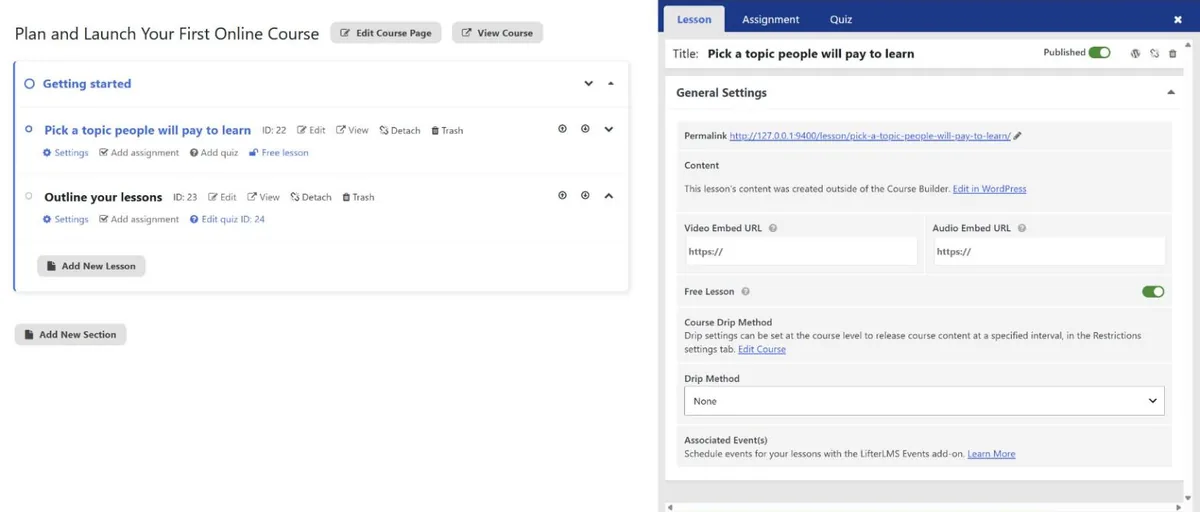
Lessons take written content, a video or audio embed URL, a minimum time on the lesson, a prerequisite lesson and a drip schedule (on a set date, or a number of days after enrollment). There’s also a course-wide drip setting.
The Free Lesson switch lets visitors open a lesson before they buy. Free previews and drip are both paid features in Tutor LMS, so this is one of the free core’s biggest advantages.
The builder also has an Assignment tab. Clicking Create New Assignment opens an “Unlock LifterLMS Assignments” upgrade prompt. Assignments are a paid add-on.
Quizzes
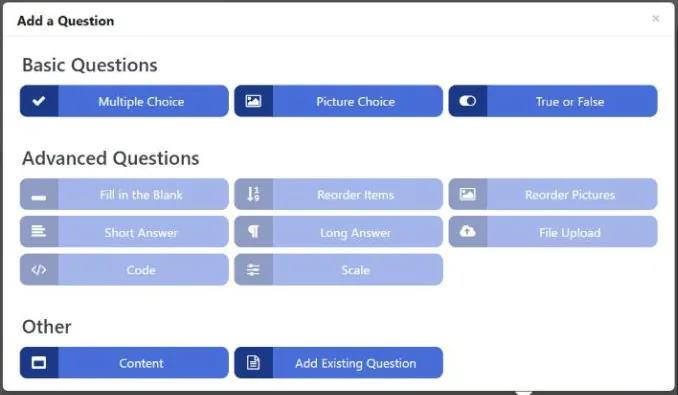
Three question types are free: Multiple Choice, Picture Choice and True or False. You can also add a Content item, which is text between questions rather than a question.
The other eight types are shown grayed out. They need the Advanced Quizzes add-on:
- Fill in the Blank, Short Answer and Long Answer
- Reorder Items and Reorder Pictures
- File Upload, Code and Scale
Advanced Quizzes is also needed for a question bank. The practical gap is written answers: the free version has no question type where students type a response.
The quiz settings cover the basics: a passing percentage (65% by default), limited attempts, a time limit, resuming a quiz, showing correct answers, randomizing questions and disabling retakes.
Students see a short intro with the pass mark and attempts left, then one question per screen. The results page shows the score as a chart, a review of each answer and a menu of previous attempts.
Pricing a course: access plans
LifterLMS prices courses with access plans, and one course can have several. The form offers:
- one-time, monthly, annual, lifetime, free, paid-trial and pre-sale plans;
- a sale price with dates, and an access period that ends after a set time, on a date, or never;
- a page to send buyers to after checkout.
Our test plan was $49, paid once, for lifetime access.
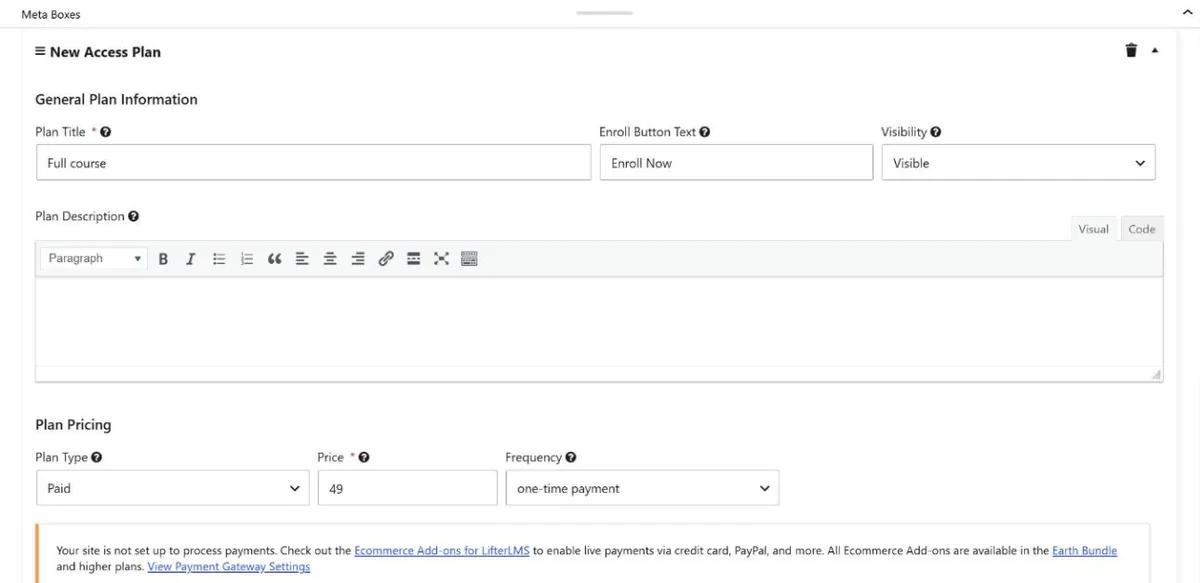
Recurring plans are there in the free version, but you can’t charge a card for them without a payment add-on. The plan form says so itself: the site “is not set up to process payments” until you add one.
Selling courses with the free version
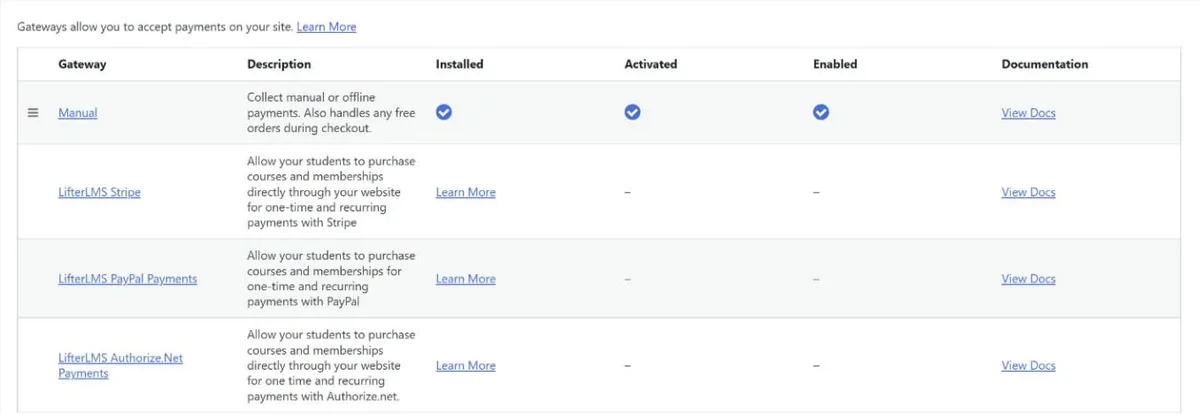
This is the big limitation. The free core has one payment method, Manual, which handles offline payments such as bank transfers, and free orders. Stripe, PayPal and Authorize.Net appear in the settings only as links to paid add-ons. Tutor LMS’s free version, by comparison, includes PayPal.
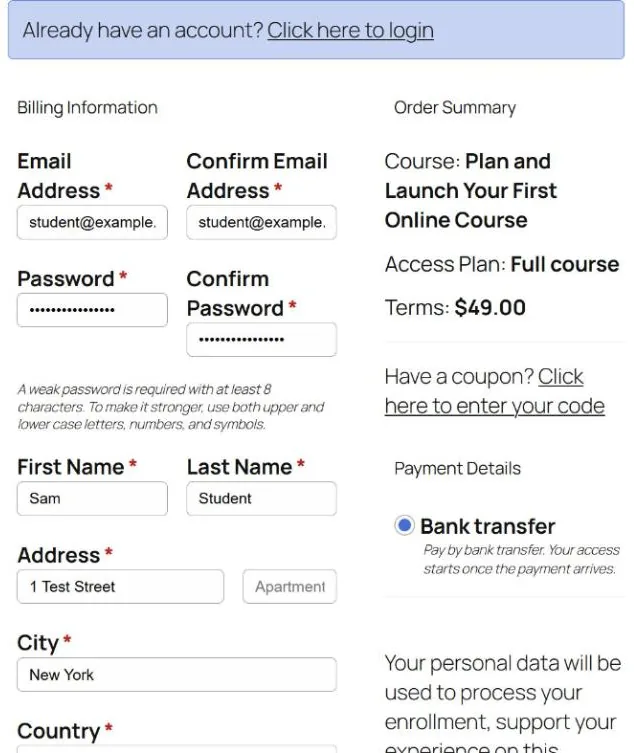
We renamed the manual method “Bank transfer” and added payment instructions. The checkout is a single page that creates the student’s account and takes the order. By default it requires a full postal address, which is a lot to ask for a digital course. LifterLMS includes a block-based forms editor for changing those fields, but we didn’t test it.
After clicking Buy Now, our student landed on an order page marked Pending Payment, with our payment instructions. A popup told them that “a payment is due for your subscription”, although this was a one-time purchase.
In the admin, changing the order status to Completed enrolled the student straight away.
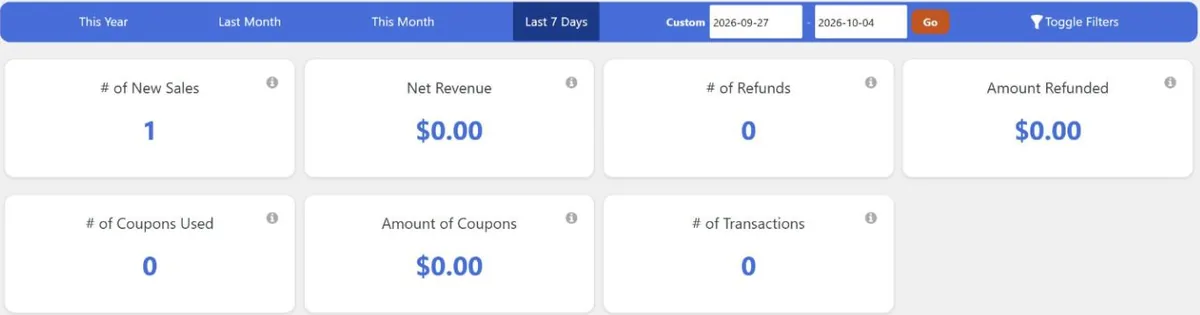
Watch out for: marking the order Completed doesn’t record any money. Afterwards, the sales report showed one new sale, $0.00 of revenue and no transactions.
The order screen has a separate Record a Manual Payment button, where you enter the amount, source and a reference. Once we recorded the $49, the payment appeared as a transaction with Refund and Resend Receipt buttons, and the sales report showed $49.00. If you take bank transfers, record each payment rather than just changing the status.

Certificates and engagements
Certificates are part of the free core, and they work well:
- Templates: you design them in the block editor, with merge codes for the student’s name, the date and the site name.
- Page settings: paper size, orientation, margins and background.
- Engagements are the automation rules that award them. You pick a trigger, such as completing a course or lesson, passing or failing a quiz, enrolling or buying, and an action: award a certificate, award an achievement badge or send an email, optionally after a delay.
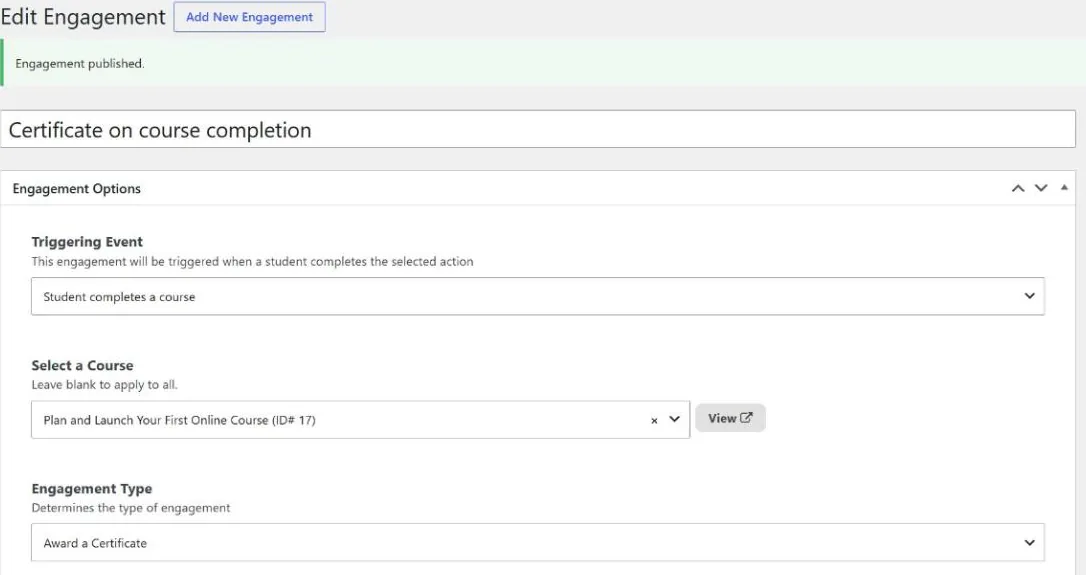
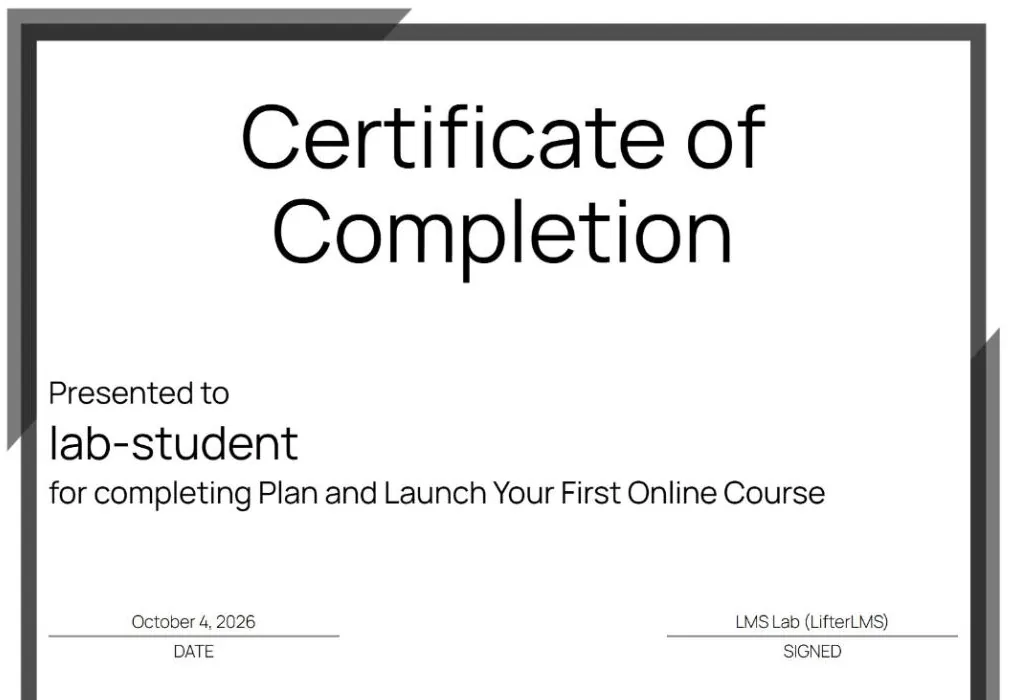
When our student passed the final quiz, the certificate was awarded immediately. Its page has Print and Download buttons, and an option to share it.
Watch out for: the certificate said “Presented to lab-student”, our student’s username. The checkout asked for a first and last name, but the default template prints the display name, which WordPress had set to the username. Change the merge code in your template before your first student finishes.
What students see
By default, lessons use your theme’s normal post layout. In Twenty Twenty-Five that meant an author line, a comments form and “More posts” under the lesson, so it looked more like a blog than a course. Popups confirm progress: after each lesson, students see one with a progress bar.
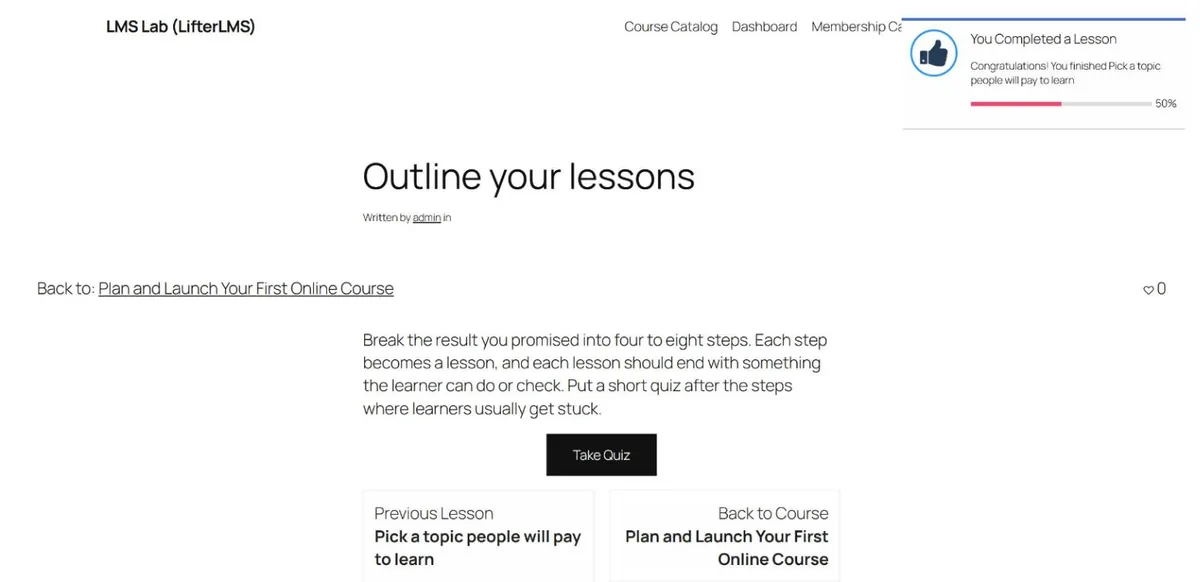
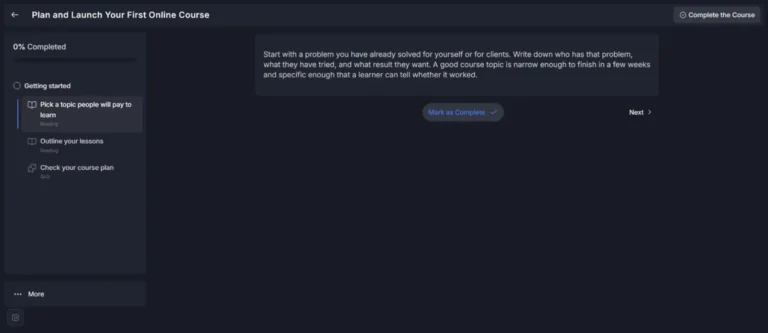
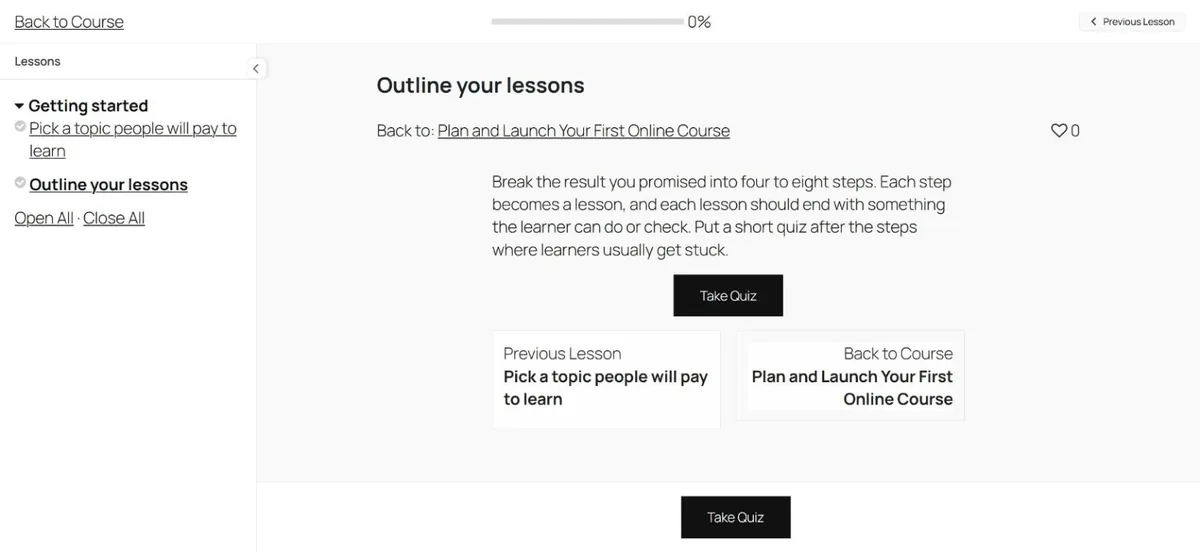
LifterLMS has a better option built in. Focus Mode, under the course settings, shows lessons in a distraction-free layout with the syllabus in a sidebar and a progress bar at the top (the screenshot at the top of this review). It’s free but switched off by default, so turn it on. In our test it showed the Take Quiz button twice, once in the lesson and again in a bar below it, which is untidy but harmless.
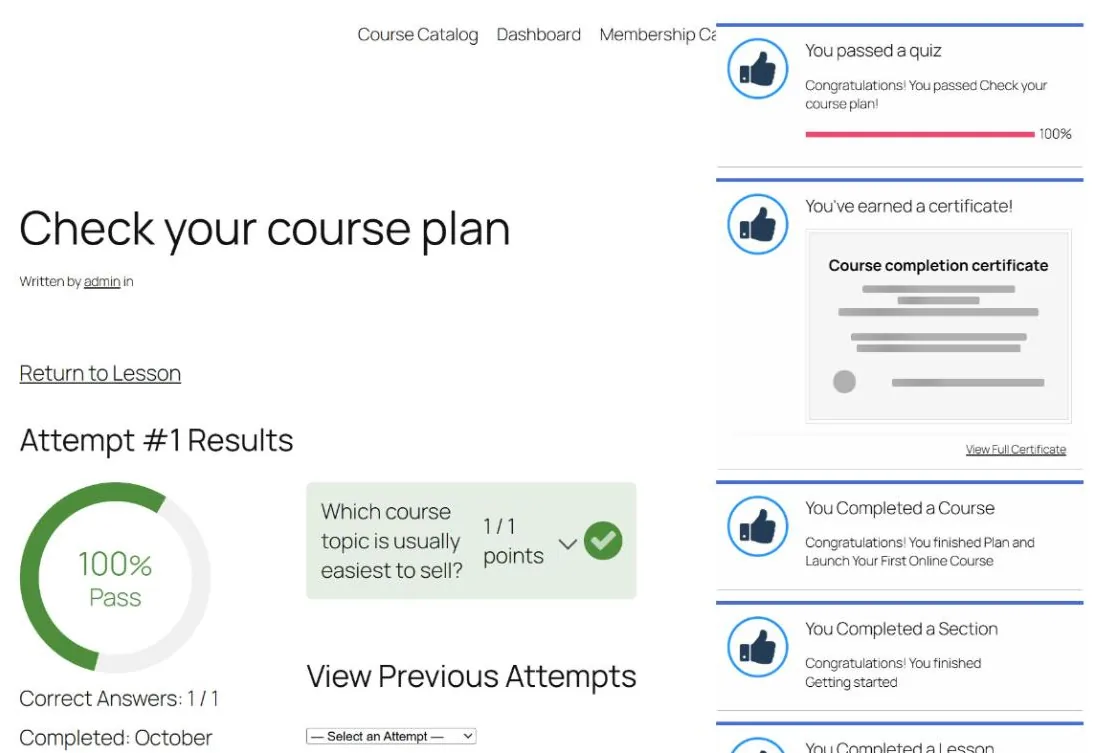
Finishing the course triggered five popups at once: quiz passed, certificate earned, course, section and lesson completed. It’s a lot, but every popup and email can be edited in the notification settings, or turned off by removing students from its subscribers.
The student dashboard has tabs for courses, grades, memberships, achievements, certificates, favorites, notifications, account details, vouchers and order history. It’s thorough, but in Twenty Twenty-Five it was squeezed into the theme’s narrow text column, and so was the checkout. Use a full-width page for the dashboard and checkout, or a theme that styles LifterLMS. Our education themes guide lists some.
Reports and admin tools
The free core includes reporting for students, courses, memberships, quizzes, sales and enrollments, with an export button. Each course has a Student Management box with every enrollment, progress, grade and last lesson, and a form to enroll students by hand. Tutor LMS keeps manual enrollment and its reports for Pro.
The notification settings list sixteen popups and emails, from a welcome email and purchase receipts to quiz results and payment reminders.
Free vs paid at a glance
| Feature | Free core | Paid |
|---|---|---|
| Course builder, lessons, video and audio embeds | Yes | Yes |
| Free preview lessons, drip, prerequisites | Yes | Yes |
| Question types | 3 basic types | 11, plus a question bank (Advanced Quizzes) |
| Certificates, achievements, automated emails | Yes | Yes |
| Memberships, coupons, vouchers | Yes | Yes |
| Manual and offline payments | Yes | Yes |
| Stripe, PayPal, Authorize.Net, WooCommerce | No | Yes (add-ons, or Earth Bundle and up) |
| Assignments | No | Yes (add-on, or Infinity Bundle) |
| Groups, private areas, social learning, advanced videos | No | Yes (Infinity Bundle) |
| Reports, manual enrollment, Focus Mode | Yes | Yes |
We didn’t build a membership in this test, so we haven’t judged how well memberships work. They are in the free core.
Pricing
LifterLMS sells add-ons one at a time or in three yearly bundles. These prices are from lifterlms.com on October 4, 2026, in US dollars. The site discounts the first year by half and says renewals are at full price.
| Bundle | Sites | First year | Each year after | What it adds |
|---|---|---|---|---|
| Earth | 1 | $199 | $398 | Stripe, PayPal, WooCommerce, Authorize.Net, cart abandonment, name your price |
| Universe | 5 | $299 | $598 | Earth, plus email marketing and form integrations and the Sky Pilot theme |
| Infinity | Unlimited | $799 | $1,598 | Universe, plus 15 advanced add-ons, including Assignments, Advanced Quizzes and Groups |
Single add-ons are sold too. On the same day, the product pages listed Stripe at $149 a year, and Assignments and Advanced Quizzes at $299 a year each. Every purchase has a 30-day money-back guarantee, a lifetime Infinity license is available, and a $1 sandbox lets you try every add-on for 30 days.
The free core is generous, but the paid route isn’t cheap:
- Card payments only: the cheapest option is Stripe at $149 a year.
- Card payments plus assignments and better quizzes: either about $750 a year in single add-ons, or the Infinity Bundle at $1,598 a year after the first year.
- For comparison: Tutor LMS Pro includes its payment gateways, assignments and certificates in one plan from $199 a year.
Who should use LifterLMS?
Best for: creators who want certificates, drip schedules, free preview lessons and memberships without paying for a license, and who can take payment offline at first (bank transfers, invoices or in-person sales). It also suits anyone who wants one plugin to grow with, adding paid features only when they become worth it.
Look elsewhere if you need card payments from day one and want to keep yearly costs low. Tutor LMS includes PayPal for free, and Tutor LMS Pro’s single plan covers Stripe as well; see our hands-on Tutor LMS review. If you’d rather pay for one complete plugin, look at LearnDash: our LearnDash vs LifterLMS vs Tutor LMS comparison sets the three side by side. Our WordPress LMS plugins comparison covers all of them. For the whole build, from hosting to launch, see our step-by-step guide to selling courses on WordPress.
Verdict
Of the LMS plugins we’ve tested so far, LifterLMS has the most complete free core. Free preview lessons, drip, prerequisites, certificates, automated emails, reports and manual enrollment all work without paying, and those are the features other plugins keep for their paid plans.
What it doesn’t do for free is take money online. For a business selling to the public, that means a payment add-on such as Stripe at $149 a year, and the full set of add-ons costs $1,598 a year from the second year.
Before launch, do three things:
- turn on Focus Mode;
- fix the certificate name;
- record manual payments properly.
With those done, the free version is a solid base for a course site.
FAQ
Is LifterLMS free?
Yes. The core plugin is free on WordPress.org, with unlimited courses, memberships and students. Add-ons are sold separately or in bundles; Stripe on its own is $149 a year.
Can the free version take Stripe or PayPal payments?
No. In our test the free core had only the Manual method for offline payments. Stripe, PayPal and Authorize.Net are paid add-ons.
Does the free version issue certificates?
Yes. We built a certificate template and an engagement in the free core, and the certificate was awarded automatically when our student finished the course.
LifterLMS or Tutor LMS: which free version is better?
LifterLMS if you want certificates, drip, free previews and memberships without paying. Tutor LMS if you want to take PayPal payments for free and have a more polished student area out of the box.