Best LMS for a Coaching Business (2026): Payment Plans and 1:1 Booking Tested

We may earn a commission if you buy through links on this page. It never changes our verdict. How we test
A coaching business isn’t a course business. You sell a program that runs for weeks, often paid in installments, with 1:1 calls in between and worksheets to check. So the questions that matter are different: can a client pay in three parts, what happens when a payment is late, and how do they book their next call?
Most of the “best LMS for coaches” lists we read were written by a vendor that ranks its own product first, and none of them tested a payment plan. So we did. We built a 12-week coaching program on our own WordPress test site, sold it to a test client in three monthly payments, let an installment fall due, and added a members-only page for booking 1:1 calls.
This guide is for life, business, career, health and fitness coaches who sell 1:1 or group programs. If “coaching” for you means an exam-prep center with classes of students, our guide to the best LMS for small schools fits better.
The short version
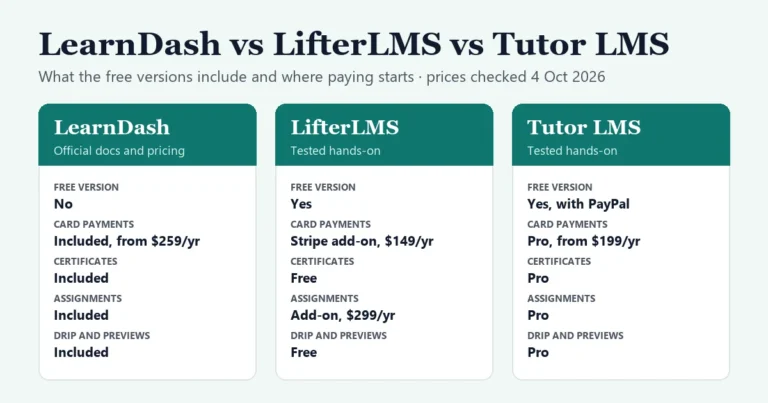
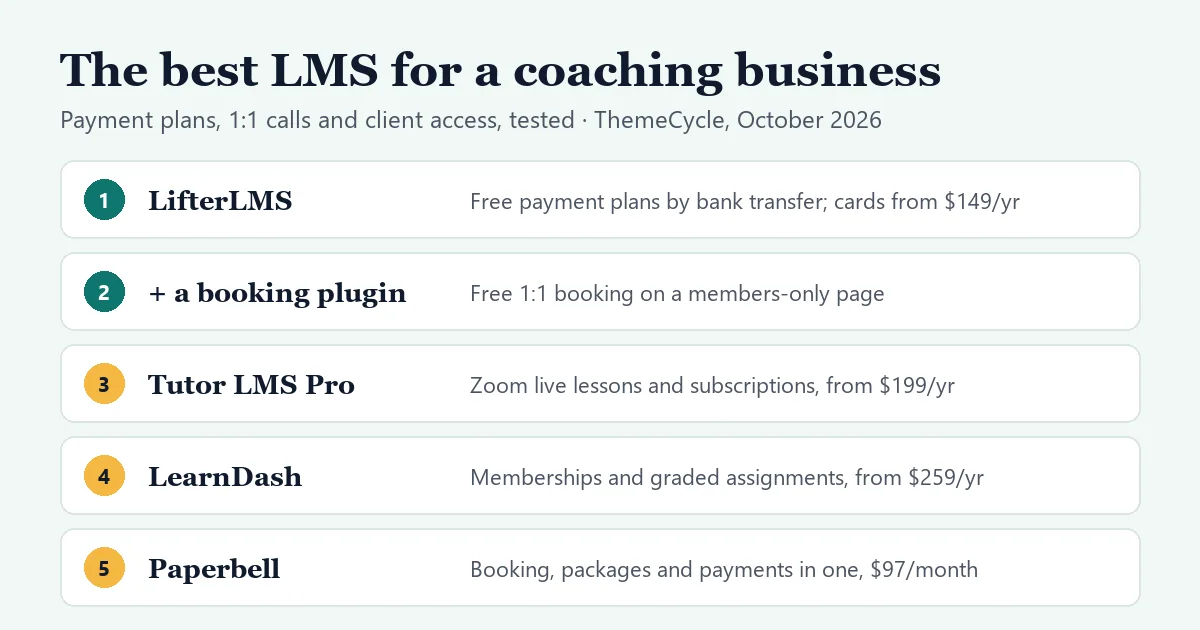
- Best free start: LifterLMS on WordPress. Its free version sold our 12-week program as 3 monthly payments of $199 by bank transfer, and locked the lessons by itself when an installment fell due. Charging cards automatically needs its Stripe or PayPal add-on, $149 a year each.
- For 1:1 calls, add a booking plugin. We put Simply Schedule Appointments’ free version on a members-only page, and our test client booked a call from it. Zoom links and calendar sync need its Plus plan, $129 a year ($99 in the first year).
- Live group calls inside the course: Tutor LMS Pro, from $199 a year, adds Zoom, Google Meet and Jitsi lessons, drip and subscriptions.
- Memberships and graded homework in every plan: LearnDash, from $259 a year.
- No WordPress: Paperbell ($97 a month) handles booking, packages and payments in one place. Kajabi’s cheapest plan is $143 a month billed yearly.
On this page
- How we tested
- What a coaching business needs from an LMS
- The options at a glance
- LifterLMS: the best free start, tested
- Adding 1:1 call booking, tested
- Tutor LMS: live lessons and subscriptions, in Pro
- LearnDash: memberships and graded homework in every plan
- MemberPress with CoachKit
- Hosted coaching platforms, if you’d rather not run WordPress
- What a year costs: one coach, 10 clients
- How to set up a coaching program on WordPress for free
- FAQ
How we tested
- Hands-on, October 6, 2026:
– LifterLMS 10.2.1 (free) and Simply Schedule Appointments 1.6.12.33 (free), on a private WordPress install. – We bought a 12-week program as a test client on a three-payment plan by bank transfer, recorded the payments as the coach, made the second installment fall due, and booked a 1:1 call. – We also looked at Tutor LMS 4.1.0’s free Q&A, and on October 24, 2026 retested it with two test students and the coach.
- Not tested hands-on: LearnDash, MemberPress, Kajabi, Teachable, Thinkific, Podia and Paperbell. Their facts come from each vendor’s pricing pages and documentation, checked on October 6, 2026.
- No real money changed hands. Our test site has no Stripe or PayPal account, so the payments were bank transfers that we recorded by hand.
What a coaching business needs from an LMS
- A program, not just a course. Content that opens week by week (drip), so clients don’t binge it on day one.
- Payment plans. For example, $597 as three payments of $199, and a clear rule for what happens when a payment is late.
- 1:1 calls. Clients book a time that suits your calendar, and get a video link.
- A private line to each client. Questions, worksheets and feedback that other clients can’t see.
- Group calls or cohorts, if you run group programs.
- Intake questions before the first call.
- Costs that suit a small client list. A 7.5% fee per sale matters when a program costs $600.
The options at a glance
| Option | Year one, software | Payment plans | 1:1 calls | Watch out for |
|---|---|---|---|---|
| LifterLMS free + SSA free | $0 + hosting | Yes, by bank transfer (tested) | Members-only booking page (tested) | You record each installment by hand |
| LifterLMS + Stripe add-on | $149 + hosting | Cards charged automatically | Same booking page | Coaching add-ons cost $299/yr each |
| Tutor LMS Pro | $199 + hosting | Subscriptions with a set number of payments | Zoom, Meet or Jitsi live lessons | Free Q&A is seen by the whole course (tested) |
| LearnDash Essentials | $259 + hosting | Subscriptions through MemberDash | No built-in booking or Zoom | No free version |
| MemberPress + CoachKit | $699 + hosting, half in year one | Subscriptions | No booking in CoachKit’s docs | Messaging is another add-on |
SSA is Simply Schedule Appointments, a booking plugin. We tested the first row; the others come from vendor pages and documentation. Hosting is a separate cost: see step 2 of our selling guide.
LifterLMS: the best free start, tested
LifterLMS’s free version is the only option here where we could sell a payment plan without paying for anything.
What we did:
- Built a course called “12-Week Career Coaching Program”, with lessons that open 7 and 14 days after enrollment.
- Added an access plan: paid, $199, every month, for 3 months. LifterLMS showed a notice that card payments need one of its ecommerce add-ons.
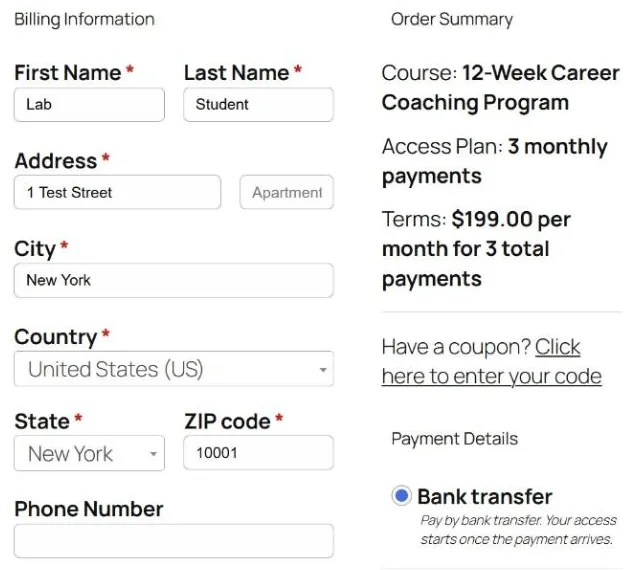
- Bought the program as a test client. The checkout said “$199.00 per month for 3 total payments” and offered bank transfer.
- As the coach, used “Record a Manual Payment” for the first $199. The order became Active, and the client was enrolled with 2 payments left.

That surprised us, because LifterLMS’s own documentation disagrees with itself here: one page says the manual gateway supports recurring plans, and an FAQ says it only handles one-time payments. In our test, the recurring plan worked. Nothing is charged automatically, though: each installment waits for you to record it.
What happens when a payment is late. We made the second installment fall due. Within the same minute:
- the order went from Active to On Hold;
- the client’s enrollment was canceled, so their lessons were locked;
- the client’s account showed the bank transfer instructions again, with buttons to update the payment method or cancel the subscription.
When we recorded the second payment, the order went back to Active and the lessons unlocked. LifterLMS also queued an email and an on-site reminder for the day before each installment.
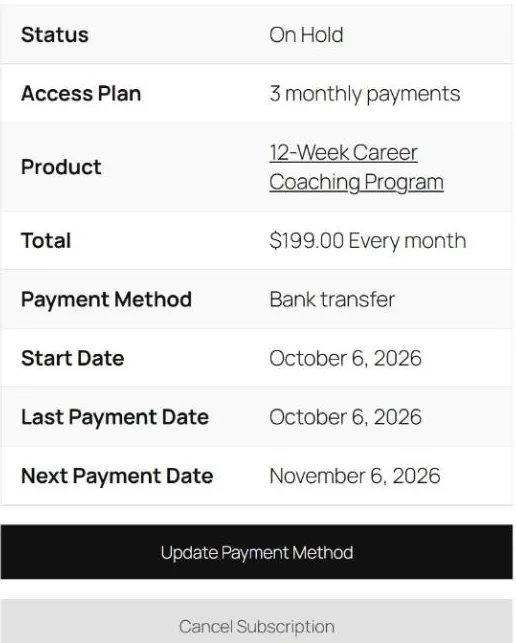
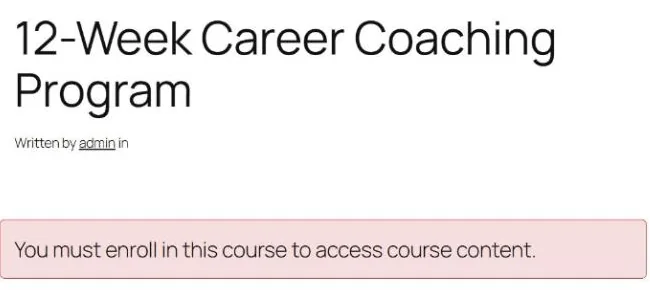
Watch out for: there’s no grace period. A client who pays a day late loses access for that day, and the course page offers them “Join the program” again, which invites a second purchase. Tell clients up front how installments work. Also, in our test the “Record a Manual Payment” form emptied the amount field when it opened, and saving it then failed with an error that said “Refund Error”. Type the amount after the form opens.
To charge cards automatically, add LifterLMS’s Stripe or PayPal add-on at $149 a year each, or its Earth bundle, which has both, at $398 a year ($199 in the first year).
Coaching extras are paid add-ons, at $299 a year each:
- Private Areas: a private space for one-to-one content and conversation with each client;
- Course Cohorts: groups who go through a program together;
- Social Learning: a community feed;
- Assignments: worksheets and uploads you review and grade.
The Infinity bundle includes them all for $1,598 a year ($799 in the first year), and it’s what LifterLMS’s page for coaches recommends.
Best for: coaches starting with a handful of clients, who can take bank transfers now and add card payments later. Our LifterLMS review covers the rest of the free version.
Adding 1:1 call booking, tested
No LMS here has a calendar for 1:1 calls in its free version, so we added one: Simply Schedule Appointments (SSA), a free booking plugin. The idea is that only paying clients can see the booking page.
How we set it up:
- Created a LifterLMS membership, “1:1 Coaching Clients”, that automatically enrolls its members in the coaching program.
- Made a page called “Book your coaching call” and, in its Membership Access box, restricted it to that membership.
- Ran SSA’s setup wizard and created a “1:1 coaching call” appointment type: 45 minutes, Monday to Friday, at least a day’s notice.
- Put SSA’s shortcode for that appointment type on the restricted page.
Logged out, the page only said that you must belong to the membership. Signed in as our test client, it showed the available days. Times were shown in the client’s own time zone, which helps with international clients, and the form was pre-filled with the client’s name and email from their account.
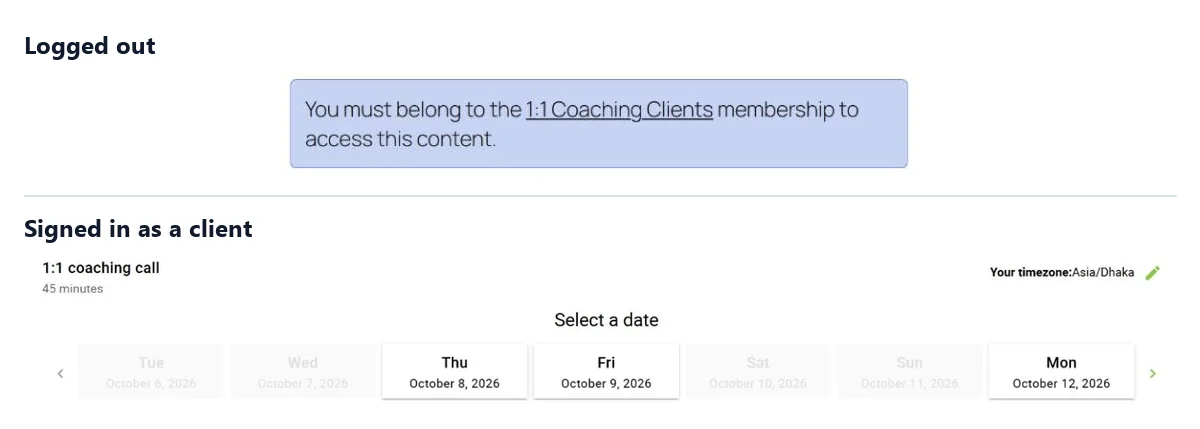
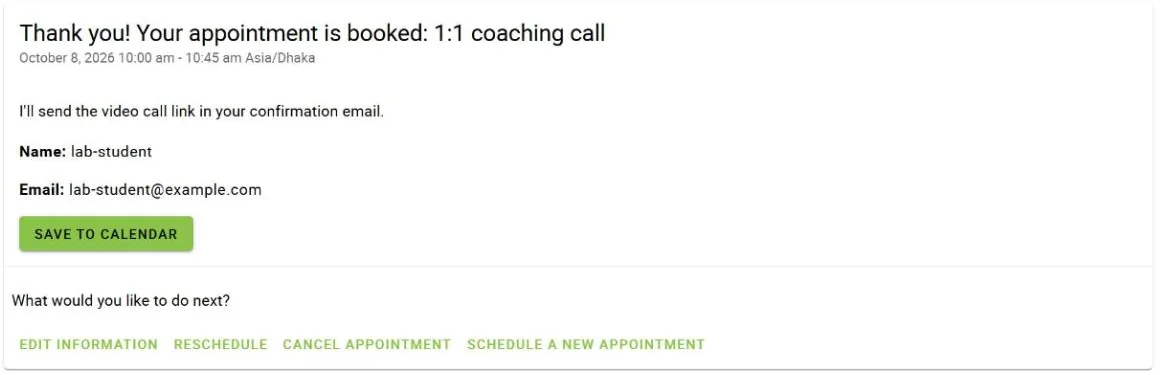
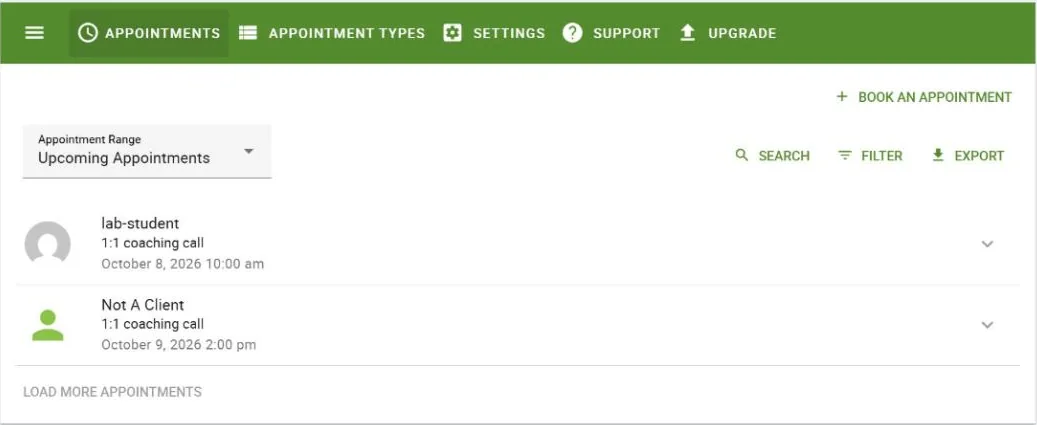
Watch out for: the membership hides the page, not the booking form itself. SSA’s booking form also has its own web address, and when we opened it logged out, we could still book. Our test visitor, “Not A Client”, booked a call next to our real client’s. Check new bookings against your client list. Or use SSA’s Professional plan, which takes payment at booking: $249 a year, or $199 in the first year.
Other quirks and limits:
- In our test, the page restriction only saved once we’d also changed something else on the page. Check the page while logged out after you save it.
- SSA’s free version has no Google Calendar sync, no automatic Zoom or Meet links, no custom intake questions and no payments. Our test confirmation said “I’ll send the video call link in your confirmation email” because we had to send it ourselves.
- SSA Plus adds calendar sync, Zoom and Meet for $129 a year ($99 in the first year), according to SSA’s pricing page.
Other free booking plugins:
- Bookly: the free version allows five services, with no calendar sync.
- Amelia Lite: takes payments only through Square, and keeps Zoom and Google Calendar for its paid plans.
We haven’t tested either.
Tutor LMS: live lessons and subscriptions, in Pro
According to Tutor’s pricing page, Tutor LMS Pro adds these, from $199 a year for one site or $499 for a lifetime license:
- subscriptions and memberships, with a billing interval and a number of payments you choose, so it can run payment plans;
- live classes on Zoom, Google Meet or Jitsi, inside the course;
- assignments and drip;
- an event calendar and Stripe.
The free version includes Q&A, notes and PayPal.
Watch out for: the free Q&A works, but it isn’t a private line to each client. In our test it was switched off in two places by default: Settings > Course, and each course’s own options in the Course Builder. Once both were on, it sat under “More > Q&A” in the lesson view. A test client posted a question, we answered it from Tutor LMS > Q&A in the dashboard, and the client saw the reply. But a second test client in the same course could read both the question, with the first client’s name, and our answer. Logged-out visitors couldn’t. So keep anything personal out of it, or use a private space such as LifterLMS’s Private Areas add-on (which we haven’t tested). Our Tutor LMS review covers the rest of what we tested.
Best for: coaches who run live group sessions and want them inside the program, on a budget of $199 a year.
LearnDash: memberships and graded homework in every plan
We haven’t tested LearnDash hands-on. Its pricing page and documentation say:
- Every plan includes MemberDash, for membership tiers, monthly or yearly subscriptions, bundles and drip by membership level.
- Every plan includes assignments. The coach can comment on each submission, approve it and award points.
- Prices: Essentials is $259 a year. Pro, at $399 a year, adds notes, group leader messages and the ProPanel reports. Elite, at $599 a year, adds group seat sales.
- No official Zoom integration. Its Blended Learning feature lets you mark a step as a virtual session and track attendance; you add the meeting link yourself.
Best for: group programs with homework to review, on a budget of $259 a year or more. Our LearnDash vs LifterLMS vs Tutor LMS comparison goes into detail.
MemberPress with CoachKit
MemberPress is a membership plugin, not an LMS, but its CoachKit add-on is built for coaching programs. We haven’t tested it. According to MemberPress:
- CoachKit organizes programs, cohorts, milestones with due dates and habit tracking.
- It’s included in the Growth plan, $699 a year ($349.50 in the first year), and up.
- Messaging needs a separate add-on, ClubConnect.
- Its documentation mentions no booking or video calls.
Best for: programs built around milestones and accountability more than lessons.
Hosted coaching platforms, if you’d rather not run WordPress
| Platform | Cheapest plan with coaching | Fee per sale | Booking |
|---|---|---|---|
| Paperbell | $97/month, or $970/year | None | Built in, with Google and Outlook sync, Zoom and Meet |
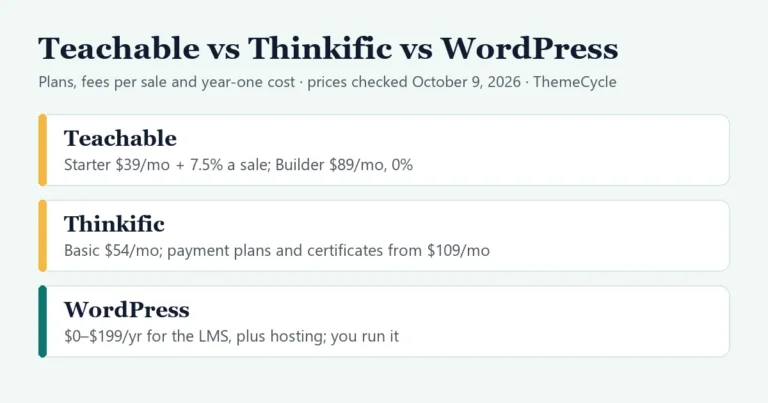
| Teachable | Starter: $39/month, or $29/month billed yearly | 7.5%, plus card fees | Built-in calendar or Calendly |
| Podia | Mover: $42/month billed yearly | 5%, plus card fees | Through Calendly and similar tools |
| Thinkific | Start, for Zoom and bookable calendars: $109/month, or $82/month billed yearly | Card fees | Bookable calendars |
| Kajabi | Basic: $179/month, or $143/month billed yearly | Card fees | Kajabi’s own scheduler, Zoom or Meet |
Source: each platform’s pricing and help pages, October 6, 2026. Coaching features on Kajabi’s Basic plan count towards its five-product limit.
What a year costs: one coach, 10 clients
Here’s one example: 10 clients a year on a $597 program, paid as three card payments of $199. That’s 30 payments and $5,970 in sales. US card fees of 2.9% + 30¢ come to about $182. WordPress setups use each vendor’s full price after the first year, with a booking plugin that sends Zoom links. Hosted platforms use their yearly billing.
| Setup | Software | Fee per sale | Card fees | Year one |
|---|---|---|---|---|
| LifterLMS free + SSA free | $0 | $0 | $0 | $0 + hosting |
| LifterLMS + Stripe + SSA Plus | $278 | $0 | $182 | $460 + hosting |
| Tutor LMS Pro + SSA Plus | $328 | $0 | $182 | $510 + hosting |
| LearnDash + SSA Plus | $388 | $0 | $182 | $570 + hosting |
| Teachable Starter | $348 | $448 | $182 | $978 |
| Podia Mover | $504 | $299 | $182 | $985 |
| Paperbell | $970 | $0 | $182 | $1,152 |
| Kajabi Basic | $1,716 | $0 | $182 | $1,898 |
The first row takes bank transfers, so it has no card fees; the LearnDash row is its Essentials plan. We assumed the same card fees for every other option, including Paperbell. On WordPress, add hosting and a domain. Your bank may charge for transfers, and you chase every payment yourself.
The hosted platforms do more of the work: one login, one support desk, and booking, payments and the client portal already joined up. WordPress costs less and you own the site, but you connect the pieces and keep them updated. Our guide to selling courses on WordPress covers that trade-off.
How to set up a coaching program on WordPress for free
This is the setup we tested. Once your lessons are written, it takes about an hour.
- Install LifterLMS and Simply Schedule Appointments (both free) on WordPress.
- Build the program as a LifterLMS course, and set later lessons to open a week apart.
- Add an access plan: paid, your installment price, every month, for the number of payments.
- Turn on the Manual payment gateway with your bank transfer details. Say in the instructions that the next lessons open when each payment arrives.
- Create a membership for your clients that auto-enrolls them in the program.
- Create a booking page, restrict it to the membership, and add your SSA appointment type’s shortcode.
- Buy your own program as a test client in a private browser window, book a call, and check the booking page while logged out.
- Every month, record each client’s payment when it arrives, and check new bookings against your client list.
FAQ
What is the best LMS for coaches on a budget?
LifterLMS’s free version on WordPress, with a free booking plugin such as Simply Schedule Appointments. In our test, it sold a three-payment program by bank transfer and let paying clients book 1:1 calls, for nothing but the cost of hosting.
Can I take payment plans on WordPress without Stripe?
Yes. LifterLMS’s free manual gateway ran our three-payment plan by bank transfer. You record each payment yourself, and the client’s lessons lock automatically while an installment is overdue.
Do I need an LMS if I only sell 1:1 calls?
Not really. A booking tool that takes payment, such as SSA’s Professional plan or Paperbell, may be enough. An LMS earns its place when clients also get lessons, worksheets or a program between calls.
Is Kajabi worth it for coaches?
It joins up scheduling, payments and the client portal, at $143–$179 a month. In our example, the same jobs on WordPress cost $460–$570 a year plus hosting, but you set them up and look after them yourself.
Can clients book a call only after they’ve paid?
On WordPress, you can restrict the booking page to a paid membership. In our test, though, the booking form’s own address stayed open to anyone. Either take payment at booking, or check each booking against your client list.