EducationPress was a paid education theme sold on this domain by the shop that used to run it. That shop has closed, its demos are offline, and the theme gets no updates. If your school or course site still runs it, this page shows what to move to. We tested five free replacement themes with a real LMS in our lab, so the advice below rests on measurements, not on theme sales pages.
ThemeCycle today is an independent guide site with no connection to the old shop (see About). We can’t provide EducationPress downloads, licenses or support, and we have no copy of the theme. There are no affiliate links on this page.
On this page
- The short answer
- What EducationPress was, and why moving matters
- How we tested
- Finding 1: the theme is a small part of a course page
- Finding 2: course pages look the same; the theme draws the frame
- Finding 3: Tutor’s lesson view replaces the theme
- Finding 4: on a phone, two themes kept the course page on screen
- What each theme brings for LMS sites
- Which one to choose
- How to move off EducationPress
- FAQ
- Related guides
The short answer
- Most course sites: Kadence or Blocksy, both free. In our test they were the only two of six themes that kept a Tutor LMS course page inside a phone screen, and both ship their own Tutor LMS styles.
- Lightest theme: GeneratePress. Its own files were 26 KB, the smallest we measured. On a phone, the Tutor course page scrolled sideways.
- LearnDash or LifterLMS sites: Kadence or Astra. Both free versions include dedicated modules for those two plugins.
- A complete academy design on day one: an all-in-one theme such as Eduma or MasterStudy, with more lock-in. See our education themes guide.
What EducationPress was, and why moving matters
These facts come from the old EducationPress product page, read in an archived copy from July 2019. We didn’t test the theme.
- A $59 education theme for colleges, universities and education centers.
- It bundled CoursePress Pro, WPMU DEV’s course plugin, as its course system.
- Page layouts used the free SiteOrigin Page Builder plugin.
- It came with three home page designs, a demo importer, and page templates for instructors, events, login and sign-up.
So an EducationPress site has two retired parts to replace, not one: the theme and CoursePress Pro. WPMU DEV has retired CoursePress Pro, and the free CoursePress plugin was closed on WordPress.org in May 2019 at its author’s request (checked October 13, 2026). Our CoursePress Pro alternatives guide covers that half of the move.
The good news: SiteOrigin Page Builder is a separate plugin that is still maintained. WordPress.org lists version 2.37.0, updated October 4, 2026. You can keep it while you change the theme. We didn’t test how SiteOrigin layouts look after a theme switch, so check each page on a staging copy.
How we tested
In our local test install (WordPress 7.1.3, PHP 8.3, Tutor LMS 4.1.0 with WooCommerce for checkout), we built one $49 course with two lessons and a quiz, and enrolled a test student. Then we loaded the same course page and lesson page under six free themes at their current WordPress.org versions, with default settings:
- Kadence 1.5.2
- Astra 4.14.0
- GeneratePress 3.6.1
- Blocksy 2.1.59
- Prespa 1.7.9, a smaller theme that roundups describe as Tutor-ready
- Twenty Twenty-Five 1.5, WordPress’s default theme, as a baseline
For each page we added up every stylesheet and script it loads, looked at it in a clean Chrome profile at desktop width, and checked it at 390 px, a common phone width. We also searched each theme’s files for LMS-specific code. We didn’t test the themes’ Pro versions, their starter templates, LearnDash or LifterLMS, or speed on a real server.
Finding 1: the theme is a small part of a course page
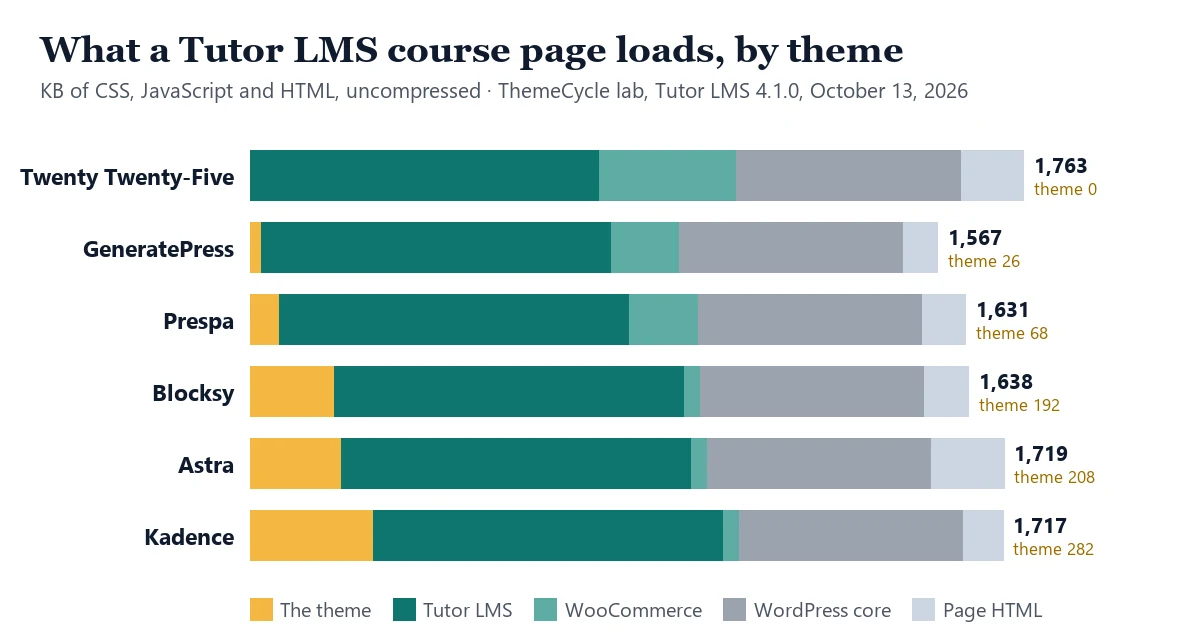
| Theme | Theme’s own files | Course page, total | Lesson page, total |
|---|---|---|---|
| Twenty Twenty-Five | 0 KB (styles inline) | 1,763 KB | 1,412 KB |
| GeneratePress | 26 KB | 1,567 KB | 1,422 KB |
| Prespa | 68 KB | 1,631 KB | 1,469 KB |
| Blocksy | 192 KB | 1,638 KB | 1,487 KB |
| Astra | 209 KB | 1,719 KB | 1,571 KB |
| Kadence | 282 KB | 1,717 KB | 1,566 KB |
Tutor LMS loaded about 797 KB of its own files on the course page and 830 KB on the lesson page, whatever the theme. WordPress itself added about 510 KB on the course page. On the course page, the five replacement themes’ own files were 2% to 16% of the total (Twenty Twenty-Five keeps its styles inline), and the whole spread between the lightest and heaviest page was about 200 KB.
These are uncompressed sizes from a test install, so a real server sends less. Compare the themes with each other, not with other sites. The lesson for an EducationPress move: pick the theme for fit and upkeep, and judge speed on the LMS and the hosting.
Finding 2: course pages look the same; the theme draws the frame
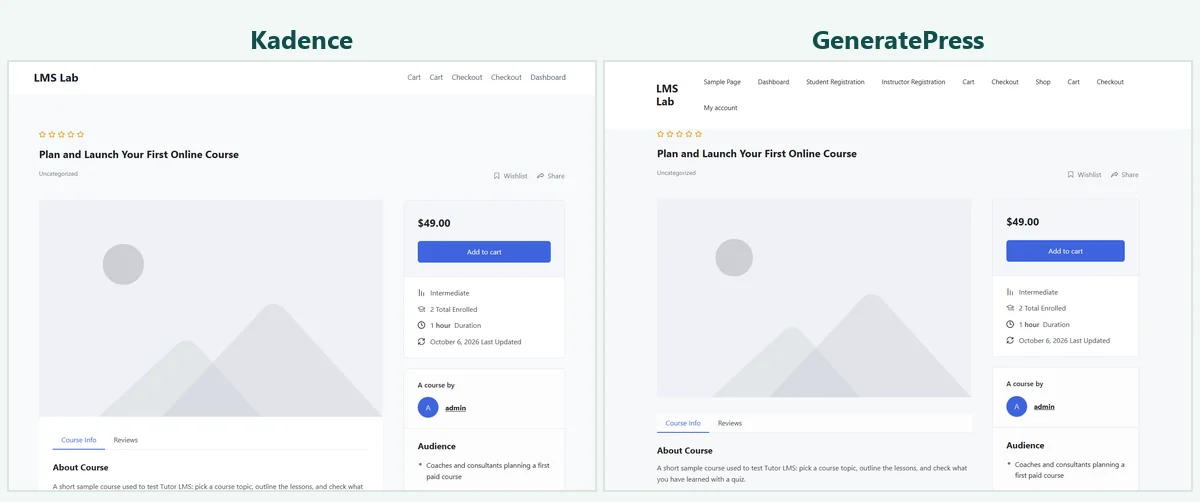
Under all six themes, the course page showed the same Tutor LMS layout: title, rating, price box with Add to cart, the Course Info and Reviews tabs, and the lesson list. The theme only set the header, footer, background and page width.
Watch out for: Prespa’s default header adds a top bar with placeholder contact details (a sample street address, phone number and email) until you change them.
Finding 3: Tutor’s lesson view replaces the theme
With Tutor’s Learning Mode on, every lesson opened in Tutor’s own full-screen layout. None of the six themes’ headers appeared on the lesson page; Tutor drew the whole screen. So for students, most of the course happens in screens the theme doesn’t touch.
Watch out for: on the lesson page, Tutor LMS 4.1.0 loaded the Inter font from Google’s servers under every theme. If your privacy policy promises no third-party requests, that comes from the LMS, and changing the theme won’t remove it.
Finding 4: on a phone, two themes kept the course page on screen
At 390 px, the Tutor course page was wider than the screen, so it scrolled sideways, under Twenty Twenty-Five, GeneratePress, Astra and Prespa. The cause was the same in all four: a hidden Tutor LMS tooltip that sticks out past the edge. Under Kadence and Blocksy the page still fit the screen. Lesson pages fit the screen under all six.
What each theme brings for LMS sites
We searched each free theme’s files for code written for specific LMS plugins. “Dedicated” means a separate integration module or file; several themes also mention other LMS plugins in passing, for example to skip their post types in layouts.
| Theme | Dedicated LMS code (free theme) | Pro price (vendor, checked October 13, 2026) | Phone test |
|---|---|---|---|
| Kadence | Tutor LMS, LearnDash, LifterLMS | Essentials bundle, $99 a year | Fits |
| Blocksy | Tutor LMS | Blocksy Pro from $69 a year (1 site) | Fits |
| Astra | LearnDash, LifterLMS | Astra Pro add-on, $69 a year (3 sites) | Scrolls sideways |
| GeneratePress | None | GP Premium, $59 a year | Scrolls sideways |
| Prespa | None found | Not checked | Scrolls sideways |
All five free themes are on WordPress.org and were updated within the last year (GeneratePress last on December 1, 2025; the others between July and October 2026, checked October 13, 2026). You don’t need a Pro version to replace EducationPress. Pro adds design controls and templates.
Which one to choose
Kadence
Best for: course sites on Tutor LMS, LearnDash or LifterLMS. It has a dedicated module for each in the free theme, and its course page fit a phone screen in our test.
The trade-off: its own files were the heaviest of the five (282 KB uncompressed). Kadence is made by Liquid Web, which also sells LearnDash.
Blocksy
Best for: Tutor LMS sites that want a modern, block-friendly theme. It loads its own Tutor styles, and the course page fit a phone screen.
The trade-off: its LearnDash and LifterLMS support is lighter than Kadence’s: a few references in the theme files, but no dedicated module like its Tutor LMS file.
Astra
Best for: LearnDash and LifterLMS sites. The free theme includes integrations for both.
Watch out for: the Tutor course page scrolled sideways on a phone in our test, and Astra has no dedicated Tutor LMS module.
GeneratePress
Best for: anyone who wants the leanest theme and doesn’t mind doing more styling work. Its own files were 26 KB.
Watch out for: no LMS-specific code, and the same sideways scroll on a phone with Tutor LMS.
Our thinking: for most EducationPress sites, start with Kadence or Blocksy and spend the effort on the LMS move.
How to move off EducationPress
- Back up the whole site, files and database.
- Make a staging copy and do everything there first.
- List what you use: the home page design, the instructor, events, login and sign-up templates, and every CoursePress Pro course.
- Choose the LMS first. Courses, students and their progress live in the LMS, not the theme. Our LMS plugin comparison and CoursePress Pro migration steps cover this part.
- Install the new theme and leave SiteOrigin Page Builder active, so pages built with it keep their content.
- Replace the template pages: the LMS gives you student dashboard, login and registration pages, and an events calendar plugin can replace the events template.
- Check pages while logged in as a student, on a phone as well as a desktop: course page, lesson, quiz and dashboard.
- Add 301 redirects from old course and page URLs that change.
- Switch the live site, then remove EducationPress and CoursePress Pro once you’re sure you won’t roll back.
Starting a course site from scratch instead? Our step-by-step guide to selling courses on WordPress covers hosting, the LMS, the theme and payments in order.
FAQ
Can I still download or update EducationPress?
No. The shop that sold it has closed, and nobody publishes updates. We don’t have the theme and can’t supply it.
Will changing the theme delete my courses?
No. Courses belong to the LMS plugin, not the theme. But EducationPress’s LMS was CoursePress Pro, which is retired, so plan that move too.
Is a free theme enough for a course site?
In our test, yes for the basics: every free theme showed the full Tutor LMS course page, and Kadence and Blocksy ship Tutor styles in their free versions. Pro versions add design options, not course features.
Will a lighter theme make my course site fast?
Only a little. In our test the theme’s own files were at most 18% of what a course or lesson page loads; the LMS was the biggest part. Hosting matters more for logged-in students.