Best LMS for Small Schools (2026): Free and Low-Cost Options Compared

We may earn a commission if you buy through links on this page. It never changes our verdict. How we test
A small school needs less from an LMS than a university does, but more than a course creator selling to strangers. You need to put a whole class into a course at once, let teachers follow their own pupils, tell the class when the quiz moves, and keep children’s data where you can account for it. And it has to cost little, because there’s no IT budget.
This guide is for schools of roughly 20 to 500 pupils without an IT department: small private schools, tutoring and coaching centers, language schools, madrasas and weekend schools, music schools and homeschool co-ops. We set up a class in LifterLMS and Tutor LMS on our own test site, checked Google’s and MoodleCloud’s terms, and priced every option for a school of 100 pupils.
The short version
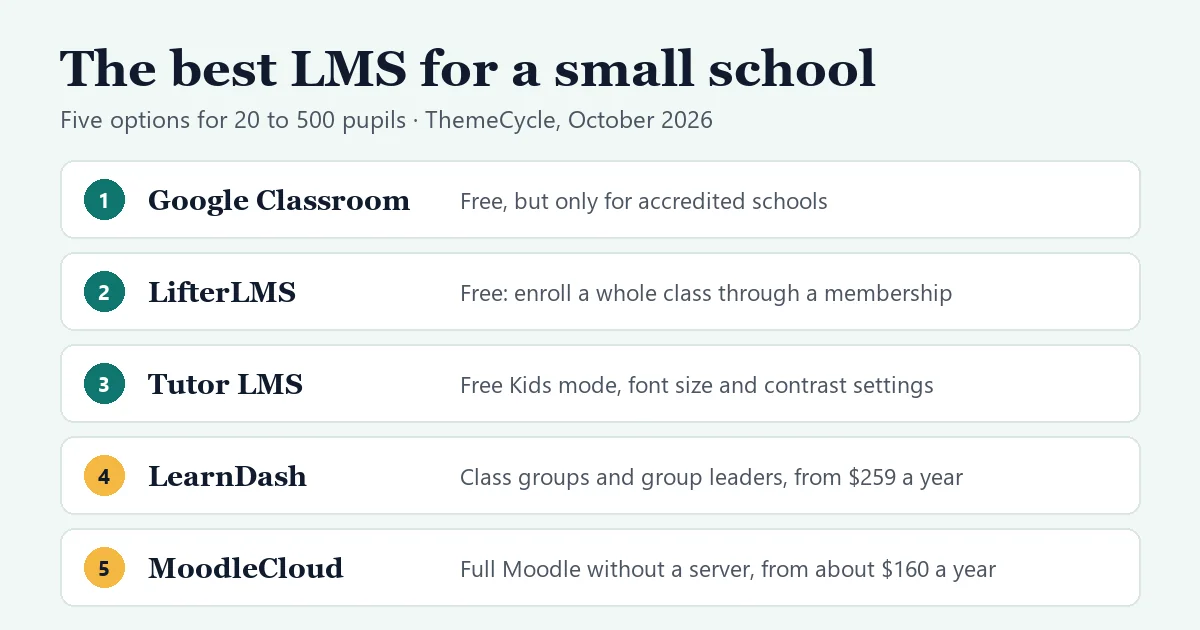
- An accredited school that already uses Google: Google Classroom. It’s free with Google Workspace for Education Fundamentals, but only for government-recognized, accredited schools. Tutoring programs, language schools and for-profit education companies don’t qualify.
- Everyone else, free, on WordPress: LifterLMS. Its free version put our whole test class into a course through a membership, and its student report has an Export button.
- Younger pupils: Tutor LMS. Its free version has a Kids mode, and each pupil can change the font size, contrast and color filter for themselves.
- Teachers who should see only their own class: LearnDash, with groups and group leaders from $259 a year, or LifterLMS’s Groups add-on at $299 a year.
- A full school LMS without WordPress or a server: MoodleCloud, from about $160 a year for 50 users.
On this page
- How we tested
- What a small school needs from an LMS
- The options at a glance
- Google Classroom: free, if your school qualifies
- LifterLMS: the best free WordPress option for running classes
- Tutor LMS: the friendliest for younger pupils
- LearnDash: when each teacher needs their own class view
- Moodle and MoodleCloud: a full school LMS without WordPress
- What about Canvas and other free LMSs?
- Children’s data and privacy
- What a year costs for 100 pupils
- How to set up a class in LifterLMS (free)
- FAQ
How we tested
- Hands-on: on October 6, 2026, we created four test pupils on a private WordPress install and enrolled them with LifterLMS 10.2.1 (free). Then we switched Tutor LMS 4.1.0 (free) to Kids mode and went through it as a pupil. Both plugins were already set up from our LifterLMS review and Tutor LMS review.
- Not tested hands-on: Google Classroom, Moodle and LearnDash. Their facts come from the vendors’ own pages and documentation, checked on October 6, 2026.
- Prices: in US dollars, from each vendor’s pricing page on October 6, 2026. MoodleCloud bills in Australian dollars, so its US prices are approximate.
What a small school needs from an LMS
Most LMS plugins are built to sell courses to the public. A school’s job is different, so check these before you choose:
- Enroll a whole class at once. Adding 30 pupils one by one gets old by the second class.
- Teacher accounts. A teacher should be able to follow their own pupils without seeing everything else.
- Announcements. “The quiz moved to Friday” should reach the class without a separate email list.
- Reports you can export. Progress and grades in a spreadsheet for parents’ evening or the head teacher.
- An interface pupils can use. Younger children need big targets and few words, and some pupils need larger text, more contrast or less motion.
- Privacy you can explain to parents. Where the data lives, who sees it, and how you’d delete it.
- A predictable yearly cost. Watch for per-pupil fees, and for add-ons you’ll need by the second term.
The options at a glance
| Option | Year one, 100 pupils | Enroll a whole class | Teachers | Watch out for |
|---|---|---|---|---|
| Google Classroom | $0 | Class code or email invitation | Teachers per class | Accredited schools only |
| LifterLMS free | $0 + hosting | Through a membership (tested) | Course instructors; class groups with leaders are a $299/yr add-on | Only three quiz question types in the free version |
| Tutor LMS free | $0 + hosting | Pupils enroll themselves; adding them yourself is Pro (tested) | Instructor accounts | Manual enrollment, assignments and gradebook need Pro, from $199/yr |
| LearnDash Essentials | $259 + hosting | Add pupils to a group | Group leaders in every plan | No free version; gradebook needs Pro ($399/yr) |
| MoodleCloud Mini | About $270 | Built into Moodle | Teacher role per course | 100-user cap; no plugins |
LifterLMS, Tutor LMS and LearnDash are WordPress plugins, so they run on your own site. We tested the LifterLMS and Tutor LMS rows; the others come from vendor pages and documentation. Hosting is a separate cost: see step 2 of our selling guide for what a site with logged-in pupils needs.
Google Classroom: free, if your school qualifies
Google Classroom comes with Google Workspace for Education Fundamentals, which is free. If your school is eligible and already uses school Google accounts, start here: there’s nothing to host or update.
The catch is eligibility. Google’s qualification page says Fundamentals is for government-recognized, accredited schools, from K–12 to universities. Among the organizations it says don’t qualify are tutoring programs, for-profit education companies, language schools, corporate training centers and community centers, even when they serve students. Many of the small schools looking for an LMS are exactly those.
Watch out for: check eligibility before you plan around it. Tutor LMS Pro’s Google Classroom integration needs Google Workspace for Education too, so it doesn’t get around the rule.
Best for: accredited schools whose pupils already have school Google accounts.
LifterLMS: the best free WordPress option for running classes
LifterLMS’s free version did the job a school needs most in our test: it put a whole class into a course without clicking through every pupil.
What we did:
- Created four test pupils as WordPress users with the “student” role.
- In the course’s Student Management panel, picked two of them under “Enroll New Students” and enrolled both with one click.
- Created a membership called “Year 5 class (2026–27)”. In its Auto Enrollment tab, LifterLMS says that when a student joins the membership, they’re automatically enrolled in the listed courses. We added the course.
- Enrolled the other two pupils in the membership. Both appeared in the course straight away, with the membership as the enrollment trigger.
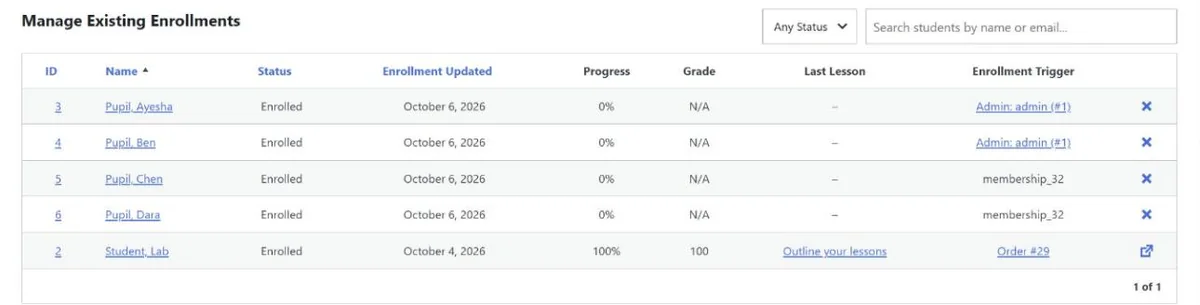
The membership is the useful part. Make one membership per class and attach the class’s courses, and a new pupil joins one thing instead of five courses. The membership needs no price or access plan for you to enroll pupils yourself. When you add a course mid-year, its “Enroll All Members” button puts the existing class in.
Reports: Reporting > Students lists each pupil’s progress, grade, enrollments, completions and certificates. It filters by course or membership and has an Export button.
What the free version doesn’t do:
- Import pupils from a spreadsheet. LifterLMS’s Import screen takes courses and templates, not students. For a long list, a WordPress user-import plugin can create the accounts.
- Class groups with their own leaders. That’s the Groups add-on, $299 a year or part of the Infinity Bundle. It adds a group leader role, seats per group, leaders who invite their own pupils and see their reports, and lets you rename “Groups” to something like “Schools”. LifterLMS was offering 50% off the first year when we checked.
- Richer quizzes. The free version has multiple choice, picture choice and true/false questions. Assignments are a $299-a-year add-on.
LifterLMS publishes an accessibility statement that targets WCAG 2.1 AA, tested with the Twenty Twenty-Four theme. We didn’t audit that claim.
Best for: schools that want a free, self-hosted LMS and organize pupils by class. Our LifterLMS review covers the rest of the free version.
Tutor LMS: the friendliest for younger pupils
Tutor LMS’s free version has something none of the others has: a Kids mode. Under Settings > Design, Learning Mode offers Modern, Kids and Legacy, with no Pro label on any of them. The default theme can be Light, Dark or Auto, which follows the pupil’s device.
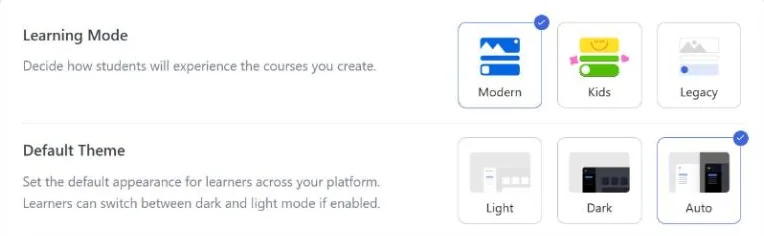
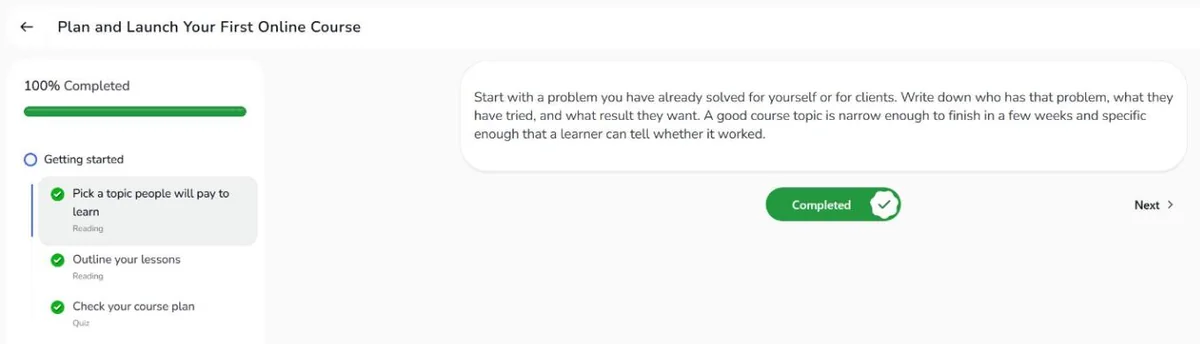
In Kids mode, lessons get rounded cards, a rounder font, a thick progress bar and a large “Completed” toggle. It’s calmer than the default learning area rather than a cartoon makeover: the lesson itself stays the same.
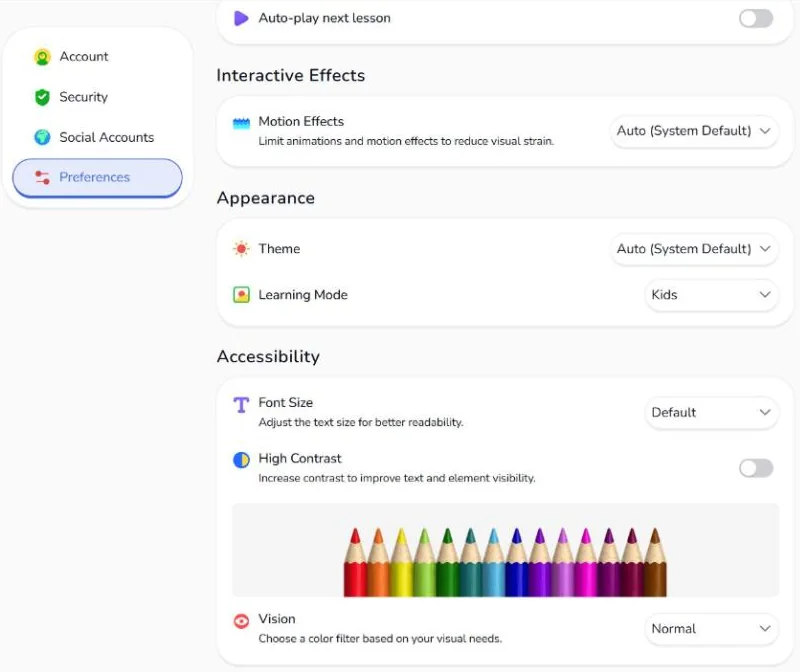
Each pupil gets their own accessibility settings. This was the surprise of the test. Under Settings > Preferences, a pupil can set:
- font size, from 60% to 200%;
- high contrast;
- a color vision filter for protanopia, deuteranopia or deuteranomaly;
- motion effects, to cut animations;
- theme: light, dark or the same as the device.
The same page has a Learning Mode menu with Modern and Kids. So the school sets the default, and an older pupil can leave Kids mode.
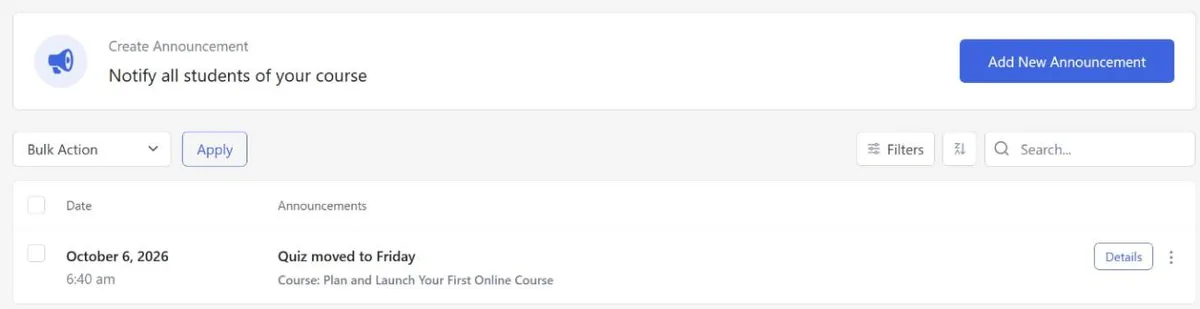
Announcements are free too. Tutor LMS > Announcements posts a notice to everyone in a course. Our “Quiz moved to Friday” took under a minute.
What the free version doesn’t do:
- Let you add pupils yourself. The free Students screen has no add or enroll button. Manual enrollment, and importing pupils from a CSV file, are part of Pro, from $199 a year for one site. In the free version, pupils enroll themselves in a free course once they have an account.
- Assignments, drip or a gradebook. Tutor’s pricing page puts these in Pro, along with live classes on Zoom, Google Meet or Jitsi.
Watch out for: the end-of-course review dialog popped up for our test pupil on a lesson page, preset to “Poor” with one star, as it did in our Tutor LMS review. A child who clicks straight through leaves a one-star review, so decide whether you want course reviews at all.
Best for: primary-age pupils, and any school where some pupils need larger text or more contrast.
LearnDash: when each teacher needs their own class view
We haven’t tested LearnDash hands-on. Its documentation and pricing page describe what a school with several teachers would want:
- Groups and group leaders in every plan. You put pupils and courses into a group, and the group leader, usually the class teacher, follows that group’s progress and quiz results.
- Essentials ($259 a year) includes assignments and quizzes with eight question types.
- Pro ($399 a year) adds a gradebook with weighted grades and report cards, the ProPanel reporting dashboard, and messages from group leaders.
- Elite ($599 a year) adds group seat sales and a separate instructor role, which most schools won’t need.
There’s no free version. LearnDash published an accessibility conformance report in May 2025 that lists known issues; read it if any of your pupils use a screen reader.
Best for: schools with several teachers who each need their own class view and gradebook, and a budget of $259–$399 a year. Our LearnDash vs LifterLMS vs Tutor LMS comparison goes into more detail.
Moodle and MoodleCloud: a full school LMS without WordPress
Moodle is the open-source LMS that many universities and schools run. It’s free to download, but you need a server and someone to keep it updated. MoodleCloud is Moodle’s own hosted version:
| MoodleCloud plan | Users | Storage | About, per year |
|---|---|---|---|
| Starter | 50 | 1 GB | $160 |
| Mini | 100 | 2.5 GB | $270 |
| Small | 200 | 5 GB | $490 |
| Medium | 500 | 20 GB | $1,190 |
| Standard | 750 | 50 GB | $2,090 |
Source: moodlecloud.com, October 6, 2026. Plans are billed yearly in Australian dollars (Starter is A$230), and local taxes can apply. There’s a 28-day free trial, and every plan includes the Moodle App’s premium features.
The trade-off: MoodleCloud doesn’t let you install plugins or integrations, and the plans cap the number of users. Moodle also has far more settings than the WordPress plugins above, so plan time to learn it.
Best for: schools that don’t want WordPress and can live within a fixed number of users.
What about Canvas and other free LMSs?
- Canvas: Canvas Lite, Instructure’s free account, is for individual educators, including a tutor or homeschooling parent teaching their own class. A school-wide Canvas needs a full Canvas license.
- Selling 1:1 or group coaching rather than running classes? See the best LMS for a coaching business.
- Other WordPress plugins: Sensei LMS, LearnPress and MasterStudy also have free versions. See WordPress LMS plugins compared; we haven’t tested them for school use.
Children’s data and privacy
Whichever option you pick, the school answers for its pupils’ data. Three sets of rules come up most often:
- COPPA (US): covers online services that collect personal information from children under 13. The FTC lets a school consent for parents when the information is used only for the school’s educational purposes.
- FERPA (US): covers schools that receive funds from US Department of Education programs. Most private K–12 schools don’t, so FERPA usually doesn’t apply to them, though state laws may.
- GDPR (EU): when an online service relies on a child’s consent, the age at which a child can consent alone is between 13 and 16, depending on the country.
On WordPress, the data stays on your own site, which makes “where is it stored?” easy to answer. To keep it that way:
- use school email addresses for pupils’ accounts where you can;
- keep plugins to the few you need, with no analytics or chat widgets on lesson pages;
- turn off public sign-up if only your own pupils should have accounts;
- know how you’d hand over or delete a pupil’s data. WordPress has Export Personal Data and Erase Personal Data tools under Tools.
This isn’t legal advice. Check the rules where your school and your pupils are.
What a year costs for 100 pupils
| Option | Software, year one | You also pay for |
|---|---|---|
| Google Classroom | $0 | Nothing; eligible schools only |
| LifterLMS free | $0 | WordPress hosting and a domain |
| Tutor LMS free | $0 | WordPress hosting and a domain |
| Tutor LMS Pro, 1 site | $199 | WordPress hosting and a domain |
| LearnDash Essentials | $259 | WordPress hosting and a domain |
| MoodleCloud Mini | About $270 | Nothing; hosting is included |
| LifterLMS + Groups | $299 | WordPress hosting and a domain |
| LearnDash Pro | $399 | WordPress hosting and a domain |
Vendor prices on October 6, 2026. Google Classroom means Workspace for Education Fundamentals; MoodleCloud Mini covers 100 users; LearnDash Pro is the plan with the gradebook. None of these charges per pupil, but MoodleCloud’s plans cap the number of users.
How to set up a class in LifterLMS (free)
This is the setup we tested. Once the course exists, one class takes about 15 minutes.
- Create the pupils’ accounts: Users > Add New with the role “Student”, or a user-import plugin for a long list.
- Create a membership for the class, for example “Year 5 (2026–27)”. You don’t need a price or an access plan to enroll pupils yourself.
- Open the membership’s Auto Enrollment tab and add the class’s courses.
- Enroll the pupils in the membership from its Student Management panel. You can pick several at once.
- Check the course’s Student Management panel: each pupil should show the membership as the enrollment trigger.
- Log in as a pupil on a tablet or phone and open the first lesson.
- Next term, add the new courses to the membership and click “Enroll All Members”.
FAQ
What is the best free LMS for a small school?
If your school is accredited, Google Classroom: it’s free and there’s nothing to host. If it isn’t, LifterLMS’s free version on WordPress is the most complete free option we tested for running classes, and Tutor LMS’s free version is the friendliest for young pupils.
Is Google Classroom free for private schools and tutoring centers?
Accredited private schools can use it free through Google Workspace for Education Fundamentals. Tutoring programs, language schools and for-profit education companies aren’t eligible, according to Google.
Can I enroll a whole class at once on WordPress?
Yes. In LifterLMS’s free version, we enrolled several pupils at once from a course’s Student Management panel, and a whole class through a membership with Auto Enrollment. Tutor LMS needs Pro for you to add pupils yourself.
Does any WordPress LMS have a mode for young children?
Tutor LMS’s free version has a Kids learning mode. Each pupil can also change the font size, contrast and color filter in their own settings.
How much does an LMS cost for a school of 100 pupils?
From $0 (Google Classroom for eligible schools, or a free WordPress plugin plus hosting) to about $270 a year for MoodleCloud’s 100-user plan, or $259–$399 a year for LearnDash. None of these options charges per pupil.