LearnDash vs LifterLMS vs Tutor LMS: Which Should You Use? (2026)

No affiliate links on this page. How we test
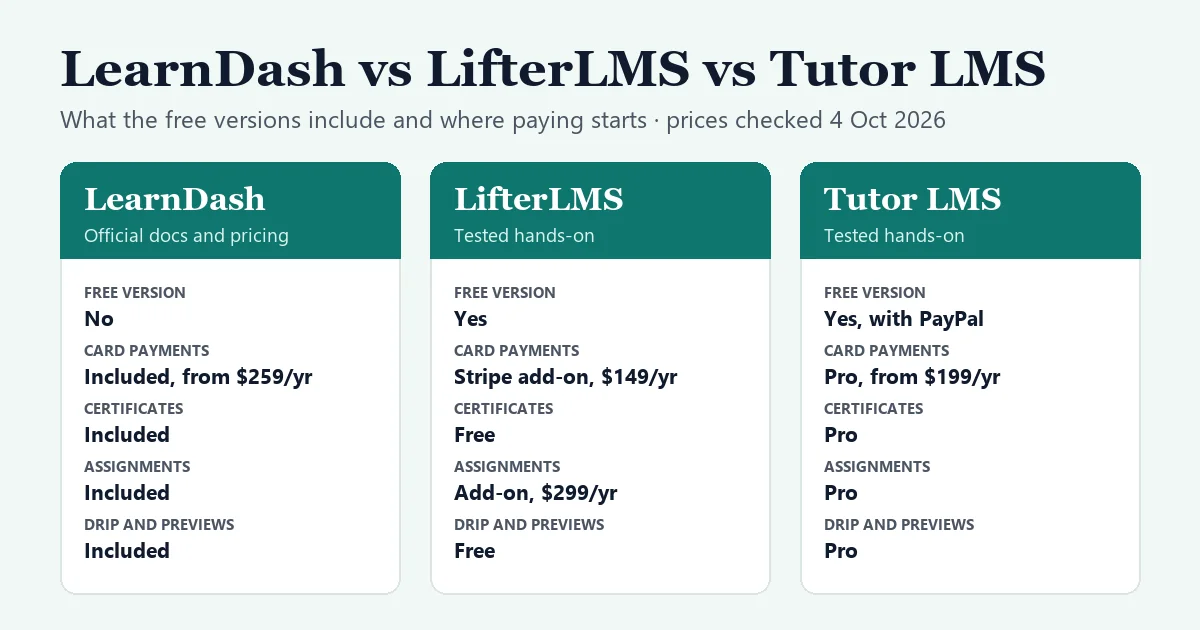
These are the three LMS plugins most people end up choosing between. LearnDash is the long-standing paid option. LifterLMS and Tutor LMS both have free versions with paid upgrades. This comparison is built on our hands-on tests of LifterLMS and Tutor LMS, and on LearnDash’s own pricing page and documentation.
The short answer
- Choose Tutor LMS if you want the most polished student area out of the box. The free version takes PayPal; Pro, from $199 a year, unlocks everything else on one site, including Stripe, certificates, drip and assignments.
- Choose LifterLMS if you want certificates, drip schedules, free preview lessons and memberships without paying for a license. You can take payments offline at first, then add Stripe for $149 a year.
- Choose LearnDash if you’re happy to pay from day one and want assignments, eight quiz question types, certificates and Stripe or PayPal checkout in one package, from $259 a year.
How we compared them
- LifterLMS 10.2.1 and Tutor LMS 4.1.0: we tested the free version of each, hands-on, on the same private WordPress install. In both we built the same $49 course, bought it as a new student by bank transfer, approved the payment and finished the course. The details are in our LifterLMS review and Tutor LMS review.
- LearnDash 5.2.1: there’s no free version to install, so everything about LearnDash here comes from its official pricing page and documentation, which now live on liquidweb.com and docs.nexcess.com (both Liquid Web companies). We haven’t tested LearnDash ourselves, and we say so wherever it matters.
- Prices: checked on each vendor’s site on October 4, 2026, in US dollars.
- Independence: none of the three vendors paid for this comparison, and this page has no affiliate links.
At a glance
| LearnDash | LifterLMS | Tutor LMS | |
|---|---|---|---|
| Free version | No | Yes | Yes |
| Online payments in the free version | No free version | None (manual and offline only) | PayPal |
| Card payments | Stripe and PayPal included | Stripe add-on, $149/yr | Pro, from $199/yr, or free through WooCommerce |
| Certificates | Included | Free | Pro |
| Drip, prerequisites, free preview lessons | Included | Free | Pro |
| Assignments | Included | Add-on, $299/yr | Pro |
| Quiz question types | 8, including essay and fill in the blank | 3 free; 11 with a $299/yr add-on | 4 free, including essay and fill in the blank; 13 with Pro |
| Memberships and subscriptions | Included | Free (recurring plans need a payment add-on) | Pro |
| Reports | Basic reports included; advanced reporting from $399/yr | Free, with manual enrollment | Pro, with manual enrollment |
| Lifetime license | None listed | Infinity Bundle only | From $499 |
| Tested by us | No: official docs | Yes, hands-on | Yes, hands-on |
What it costs over three years
List prices on October 4, 2026, for one site. LifterLMS says its renewals are at full price. LearnDash’s and Tutor LMS’s pricing pages don’t state a renewal price, so we’ve assumed today’s price each year. LearnDash’s pricing page also doesn’t say how many sites a license covers, so check that before you buy for several sites.
| What you need | LearnDash | LifterLMS | Tutor LMS |
|---|---|---|---|
| Card payments and certificates | $777 (Essentials, $259 × 3) | $447 (free core + Stripe, $149 × 3) | $597 (Pro, $199 × 3) or $499 lifetime |
| Plus assignments and more quiz types | $777 (all included) | $2,241 (Stripe, Assignments and Advanced Quizzes, $747 × 3) or $3,995 (Infinity Bundle) | $597, or $499 lifetime |
| Free, taking payment offline | Not possible | $0, with certificates and drip | $0; PayPal works too, but no certificates |
Three things stand out:
- Cheapest for a simple paid course with certificates: LifterLMS, because certificates and drip are free and Stripe is the only thing you buy.
- Cheapest once you need assignments: Tutor LMS Pro, especially the $499 lifetime license if you’ll run the site for more than two and a half years.
- The trap: LifterLMS add-ons add up fast. Three of them cost more each year than LearnDash Essentials, which already includes all three features.
LifterLMS also discounts the first year of its bundles by half, and its add-on pages advertise a 50% first-year coupon. The three-year totals above use list prices. Tutor LMS prices exclude VAT.
Building courses
Tutor LMS has the quickest builder we tested. It’s a full-screen editor in three steps. The Basics step holds the title, description, featured image, intro video and price. Under Curriculum you add topics, lessons and quizzes, each saved as soon as you finish it.
LifterLMS splits the work in two:
- The course page is a normal post in the block editor, pre-filled with LifterLMS blocks. The price lives in Access Plans, in a panel that was collapsed at the bottom of the editor.
- Sections and lessons go in a separate drag-and-drop course builder. It’s flexible, but nothing is stored until you click Save changes.
LearnDash, according to its documentation, also has a drag-and-drop course builder. Courses contain lessons, topics and quizzes, and you can reuse quiz questions across quizzes. The pricing page lists an AI course-outline and quiz builder on the Pro plan.
Watch out for: two quirks from our tests.
- In Tutor LMS, a second lesson opened pre-filled with the first one’s text.
- In LifterLMS, the builder created three empty lessons we hadn’t asked for.
Neither is serious, but check your first course carefully in either plugin.
Quizzes
The free versions differ more than you’d expect.
- Tutor LMS free: four question types: True/False, Multiple Choice, Open Ended/Essay and Fill in the Blanks. The quiz settings are generous: random order, a question pool, attempts, time limits and a pass mark.
- LifterLMS free: three types: Multiple Choice, Picture Choice and True or False. There’s no way for students to type an answer until you buy Advanced Quizzes ($299 a year).
- LearnDash: eight types, according to its documentation: single choice, multiple choice, free choice, sorting, matrix sorting, fill in the blank, assessment (survey) and essay. It also documents time limits, random subsets of questions, and certificates for passing a quiz.
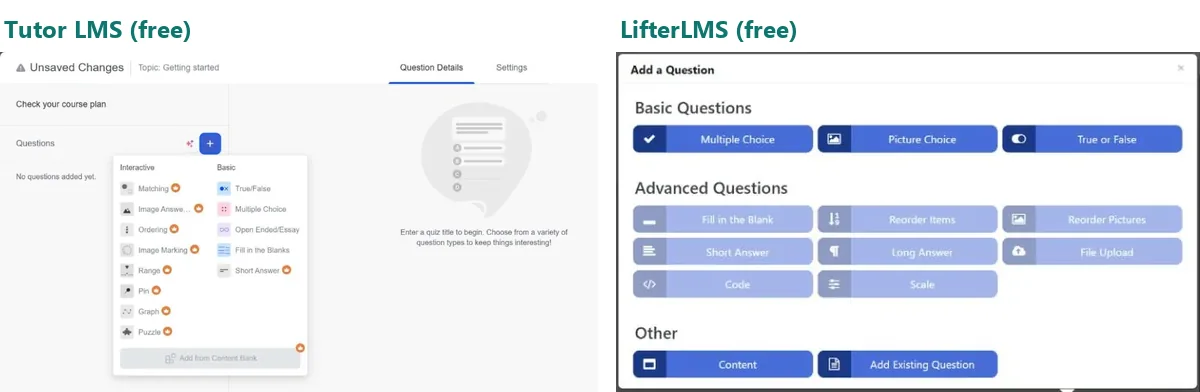
Watch out for: in Tutor LMS, “Answer Required” is off by default, and our first test attempt went through with no answer at all. Switch it on for questions that matter.
Selling courses and taking payments
This is where the three differ most.
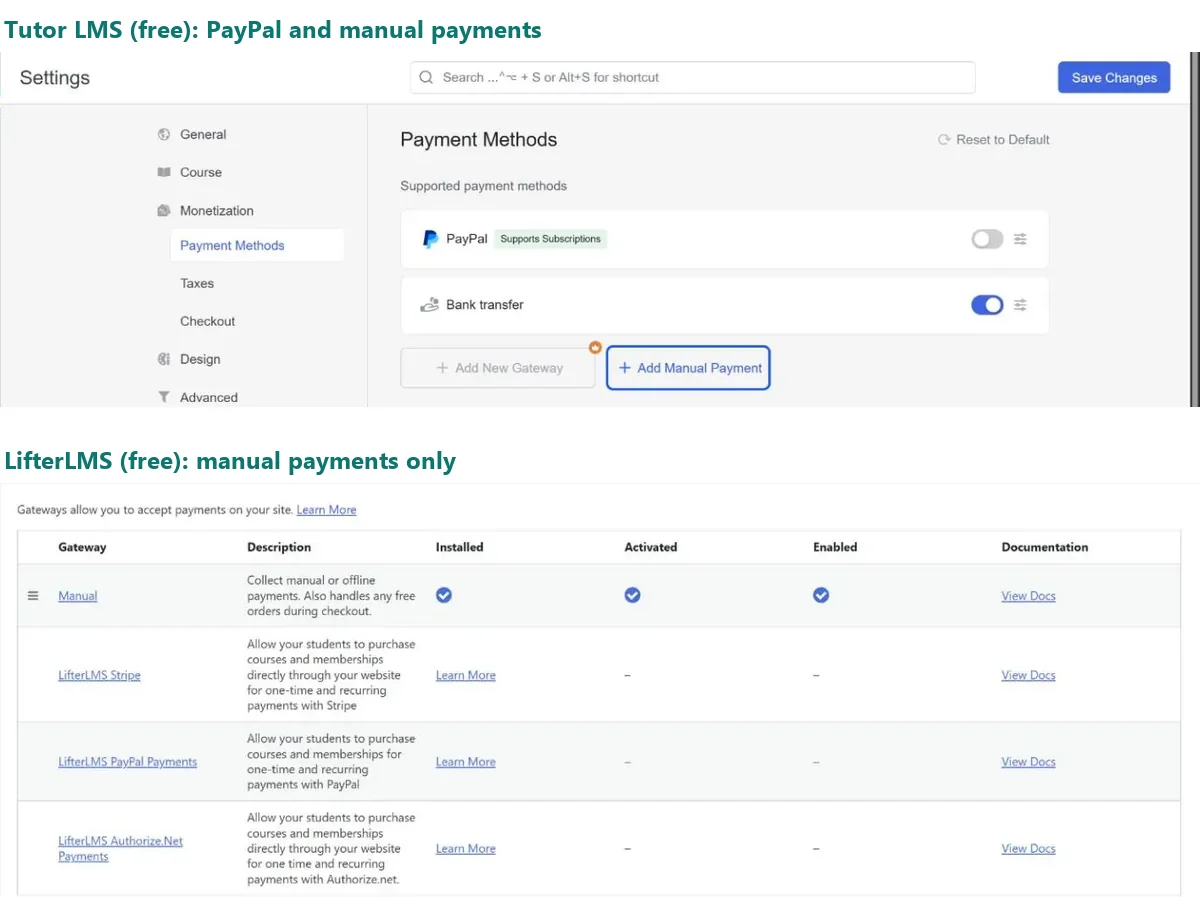
Tutor LMS free has its own cart and checkout, and takes PayPal and manual payments such as bank transfer. Stripe and other gateways need Pro. In our test, the checkout asked for a phone number and a full address, and the course page offered “Add to Cart” again while the bank transfer was still pending.
LifterLMS free takes no online payments at all: only manual and offline payments. Stripe ($149 a year), PayPal and Authorize.Net are paid add-ons.
Tutor LMS’s free version can also hand selling over to WooCommerce, whose official Stripe plugin is free. We tested that route, and the fees of each option, in our payments guide.
Its access plans are the most flexible of the three:
- one-time, monthly, annual, lifetime, trial and pre-sale plans;
- sale prices with start and end dates;
- access that expires after a set time or on a date.
LearnDash includes Stripe, PayPal, Razorpay and 2Checkout, according to its documentation. Courses can be sold as one-off purchases or as recurring subscriptions with trials. Coupons only work on one-off purchases.
Watch out for: in LifterLMS, marking a bank-transfer order as Completed enrolls the student but records no money. Our sales report showed one sale and $0 revenue until we used Record a Manual Payment.
Certificates, drip and engagement
LifterLMS gives the most away for free:
- certificates designed in the block editor;
- achievements and automated emails;
- drip schedules, prerequisites and free preview lessons.
We set up a rule that awarded a certificate when a student finished the course, and it worked first time. One fix to make before launch: the default certificate printed our student’s username instead of their name.
Tutor LMS keeps certificates, drip, prerequisites, free preview lessons, manual enrollment and automated emails in Pro.
LearnDash’s documentation covers:
- PDF certificates for finishing a course or passing a quiz;
- drip by days after enrollment or by date;
- prerequisites;
- unlimited “sample” (free preview) lessons.
Its pricing page lists the certificate builder, achievements and learner notifications in every plan.
What students see
Tutor LMS has the most finished student experience of the two we tested. Students get a dedicated learning area with a progress bar, a lesson list and a focused quiz screen, whatever theme the site uses.
LifterLMS shows lessons in your theme’s normal post layout by default. In a default theme that meant an author line and a comments form under each lesson. Its free Focus Mode fixes this with a sidebar syllabus and progress bar, but it’s switched off by default.
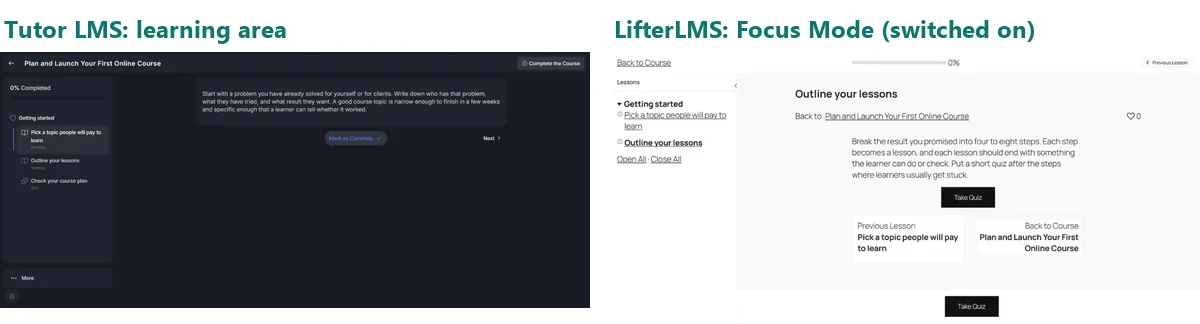
LearnDash documents a similar Focus Mode, but we haven’t seen it in use.
Watch out for:
- In our Tutor LMS test, the end-of-course review prompt was preset to the lowest rating.
- LifterLMS stacked five popups at once when our student finished.
Admin, reports and teams
- LifterLMS free includes reports on students, courses, quizzes and sales, plus manual enrollment from the course screen.
- Tutor LMS keeps reports, the gradebook and manual enrollment for Pro, along with multi-instructor courses.
- LearnDash documents basic reports, groups and group leaders in the core plugin. Advanced reporting and weighted grading start at Pro ($399 a year). Group seat sales, an instructor role and front-end course creation are on Elite ($599 a year).
Which one should you choose?
- A solo creator on a tight budget who wants certificates: LifterLMS. Start free with bank transfers or invoices, and add Stripe when sales justify $149 a year.
- A course business that wants a polished academy and card payments for under $200 a year: Tutor LMS Pro, or its $499 lifetime license.
- A training team, school or company that needs assignments, groups and reporting: LearnDash, which includes them without add-ons. Budget for Pro or Elite if you need advanced reporting or group management.
- Several instructors on one site: Tutor LMS Pro, or LearnDash Elite.
- Not sure yet: install Tutor LMS and LifterLMS on a test site and build one real lesson in each. Both are free.
For a wider look that adds Sensei LMS, LearnPress and MasterStudy, see our WordPress LMS plugins comparison. If you’re choosing a theme as well, our education themes guide lists themes that support these plugins.
Verdict
There’s no single winner, because the three charge for different things:
- LearnDash charges for everything up front, and then has few extras to buy.
- LifterLMS gives you the most course features for free, then charges separately for payments and advanced tools.
- Tutor LMS gives you the nicest student experience for free, then puts nearly every serious feature behind one affordable Pro plan.
For most new course creators, we’d start with whichever free version matches how you plan to take payments: Tutor LMS for PayPal, LifterLMS for offline payments plus free certificates. Look at LearnDash when you’re ready to pay for a complete, assignment-heavy setup.
FAQ
Which is better, LearnDash or LifterLMS?
LearnDash, if you’ll pay anyway and need assignments and more quiz types, because it includes them. LifterLMS, if you want to start free or only need certificates and card payments, which cost $149 a year with LifterLMS against $259 for LearnDash Essentials.
Is Tutor LMS better than LearnDash?
For many solo creators, yes on price: Tutor LMS Pro starts at $199 a year, or $499 for a lifetime license, and the free version can already take PayPal payments. LearnDash has no free version, and its documentation covers more for training teams, such as groups and group leaders in the core plugin.
Does LearnDash have a free version?
No. Its pricing page lists three yearly plans, Essentials ($259), Pro ($399) and Elite ($599), and its documentation describes a refund within 30 days of the first purchase.
Which LMS plugin is free?
LifterLMS and Tutor LMS both have free versions on WordPress.org. LifterLMS’s includes certificates and drip but no online payments. Tutor LMS’s includes PayPal but not certificates or drip.